



OpenAI has launched Dots, a new line of always-on AI agents designed to work on users’ behalf across ongoing projects and everyday tasks. Announced at OpenAI’s DevDay on September 29, 2026, Dots run on their own cloud computers, use connected apps and learn from user feedback. OpenAI is also developing specialist Dots for enterprise responsibilities.
- What Are OpenAI Dots and How Do They Work?
- Dots Can Work in the Background
- How Dots Could Be Used
- Dots Enter the Enterprise AI Race
- Privacy, Permissions and Safety Controls
- Availability and Access
- Launch Comes Amid Growing AI-Agent Competition
- What OpenAI’s Dots Launch Means for AI Agents
- Spiritual Knowledge and the Search for Truth
- FAQs on OpenAI Dots
What Are OpenAI Dots and How Do They Work?
OpenAI describes Dots as always-on agents designed to handle tasks with less need for step-by-step direction. They are powered by GPT-6 Astra and operate through their own cloud computer and browser. Through OpenAI’s ecosystem of plugins and connected tools, Dots can connect to more than 4,000 apps. Access, however, depends on the apps a user chooses to connect and the permissions granted to the Dot.
A Dot can continue working on a project while handling other tasks. Users can add new ideas or assignments without having to manage separate conversation threads or direct every individual step. Users can communicate with Dots through ChatGPT on desktop, web and mobile. They can also interact with them through Slack and Microsoft Teams, while texting support is planned.
Also Read: How LLMs Like ChatGPT Actually Works: A Complete Simple Guide
OpenAI says Dots carry context across these channels, allowing a project started in ChatGPT to continue through other connected platforms.
Dots Can Work in the Background
One of the defining features of Dots is their ability to continue working when users are not actively interacting with them.
OpenAI calls this background activity “proactive research”. In this mode, Dots use connected applications with tools restricted to read-only access. They cannot use these tools to send messages, modify app content, or control the user’s browser or computer.
Dots can also operate using their own cloud computers, separate from a user’s computer unless the user specifically gives permission to connect to another device. Users can open the Dot’s computer and inspect its work.
OpenAI says Dots can use saved passwords to sign into supported websites without exposing those passwords to the AI model.
How Dots Could Be Used
OpenAI has presented several examples of how Dots could handle ongoing professional work:
| Use case | What the Dot can do |
| Software development | Monitor customer feedback, identify recurring requests, build and test fixes and prepare pull requests for review |
| Product launches | Revise launch materials when product scope or direction changes |
| Scientific research | Rerun analyses, investigate unexpected results and update figures and explanations as new evidence arrives |
| Enterprise sales | Check requirements, identify testing needs, build a proof of concept and update proposals |
| Content production | Analyse interview transcripts, identify clips, prepare show notes and draft social posts |
In one example outside OpenAI, an early tester’s Dot noticed that the user had forgotten to invoice a publication, prepared the invoice and sent it after receiving approval.
OpenAI also says Dots can learn users’ preferences, standards and working styles from feedback over time. Users can give their primary Dot a name and customize it.
Dots Enter the Enterprise AI Race
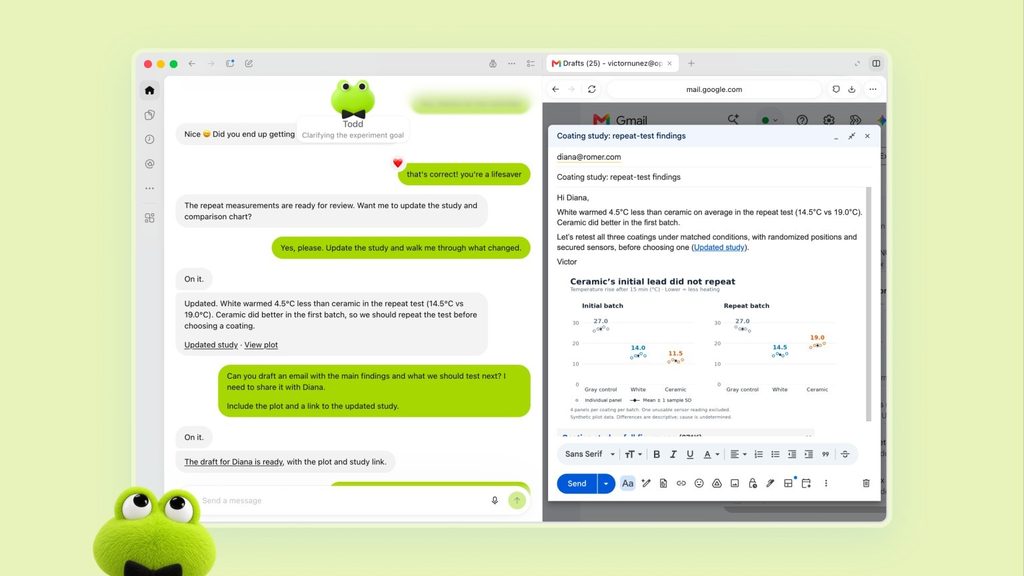
Image (Open AI)
The launch places OpenAI deeper into the growing market for autonomous AI agents. Reuters reported that OpenAI’s move puts Dots in competition with Meta’s Muse and reflects the broader industry shift from conversational chatbots toward systems that can act on users’ behalf.
Meta’s Muse had gained attention after its rollout, while other companies and startups were also developing personal and workplace-focused agents.
OpenAI is positioning Dots beyond individual productivity. The company has introduced a preview of “specialist Dots” designed to take on defined responsibilities inside organisations.
These specialist agents can have their own identity, credentials and access to the systems required for their assigned work. OpenAI said early internal testing had covered areas including procurement, invoice processing, email marketing, customer support and commercial contracting.
Also Read: ChatGPT Atlas: The Intelligent Browser Built for the Next-Generation Web Experience
OpenAI is beginning with focused enterprise pilots and plans to work directly with organisations to define each specialist Dot’s responsibilities, tools and approval process.
The company is also working with Microsoft to integrate specialist Dots with Microsoft Agent 365’s enterprise governance and security controls.
Privacy, Permissions and Safety Controls
Because Dots can act across connected applications, OpenAI has placed significant emphasis on permissions and safeguards. Users decide which applications Dots can access through existing ChatGPT app controls. Built-in rules determine when a Dot can act independently and when it should request approval. Custom Rules can allow specific actions, require approval or block actions.
Dots also use an auto-review system to assess actions that could affect accounts or share information against user instructions, Custom Rules and safety requirements. Certain sensitive actions remain under user control. OpenAI specifically identifies actions such as changing passwords as tasks requiring user involvement.
Security safeguards are designed to detect potentially harmful behaviour or malicious instructions. OpenAI says its monitoring system can pause or stop a Dot if it detects a safety concern.
Business, Enterprise and Edu workspace content is not used to improve OpenAI’s models by default.
Personal-plan users can control whether their Dot conversations and work are used for model improvement through their settings. OpenAI also says it does not directly train on proactive research or a Dot’s self-notes, although information from them may inform an eligible conversation or task depending on user settings.
Availability and Access
Dots began rolling out on September 29, 2026, to ChatGPT Pro and Business Premium users in eligible markets. Enterprise users, including Edu and Healthcare, can access the beta when their workspace administrator enables it.
The first Dot is included with Pro and Business Premium plans at no additional cost. OpenAI says the service is available 24/7, while the plans also include an allowance for deeper work with extended limits during the first month after launch. Conversations with Dots do not count toward ChatGPT usage limits. However, tasks that a Dot starts or manages through Codex or ChatGPT Work continue to count toward the applicable usage limits.
Users can create their first Dot through the ChatGPT desktop app or desktop browser, connect their applications and complete the initial setup. Afterward, the Dot can also be accessed through the ChatGPT mobile app.
Also Read: How the Internet Works When You Open a Website – Explained
Launch Comes Amid Growing AI-Agent Competition
The Dots launch comes as AI companies increasingly compete to develop agents capable of carrying out multi-step tasks rather than simply responding to prompts.
The launch event also included technical difficulties during live demonstrations. Reuters reported that some Dots repeatedly failed to deliver voice updates in response to requests during the presentation. The Verge described Dots as OpenAI’s response to Meta’s Muse, while TechCrunch reported that OpenAI is packaging several capabilities associated with agentic systems into a single product focused on independent actions.
OpenAI says it plans to expand Dots to more users and eventually allow people to work with multiple Dots. The company also says specialist Dots could take on increasingly well-defined responsibilities inside organisations.
What OpenAI’s Dots Launch Means for AI Agents
Dots mark OpenAI’s move toward AI systems that remain engaged with projects instead of operating only within individual conversations. Their cloud-based environment, connected applications, persistent context, background research and approval controls are designed around ongoing work.
For users, the initial rollout combines personal assistance with professional workflows. For organisations, specialist Dots provide a route toward agents with defined identities, permissions and responsibilities. OpenAI says it will continue improving Dots as it learns how people use them.
Spiritual Knowledge and the Search for Truth
The idea of continuous learning and responsible action also connects with the broader spiritual emphasis on seeking knowledge through scriptural evidence. Tatvdarshi Sant Rampal Ji Maharaj has invited spiritual leaders for a scripture-based debate also called as Shastrarth. This is one-of-a-kind way to give people one directional path of worship.
The proposed discussion is scheduled to begin on October 3 and 4, 2026, from 7:30 pm to 9:30 pm, with the programme to be broadcast on Sadhna TV. The discussion will refer to the four Vedas, Bhagavad Gita, Puranas, Ramayana and Mahabharata etc.
For more information visit Sant Rampal Ji Maharaj YouTube Channel.
FAQs on OpenAI Dots
1. What are OpenAI Dots?
OpenAI Dots are always-on AI agents powered by GPT-6 Astra that can work on ongoing tasks through connected apps and cloud computers.
2. What apps can OpenAI Dots access?
Dots can connect to more than 4,000 apps through OpenAI’s ecosystem, subject to the apps and permissions users provide.
3. Are OpenAI Dots available to everyone?
Dots are rolling out to Pro and Business Premium users in eligible markets, with an Enterprise beta available when administrators enable it.
4. Can Dots work without constant user instructions?
Yes. Dots can continue working on assigned projects and conduct restricted read-only proactive research in the background.
5. How does OpenAI control Dots’ actions?
Users can manage app permissions, Custom Rules and approvals, while auto-review and safety monitoring help control consequential or potentially harmful actions.