


Most people already use cloud storage to save photos, documents and work files online. But many still choose a platform based on storage space alone, overlooking important differences in workflow, security, collaboration and long-term flexibility. Google Drive, Dropbox and OneDrive may serve the same fundamental purpose, but each takes a unique approach to organising files, enabling collaboration and supporting everyday workflows. In this guide, we’ll compare their strengths, trade-offs and real-world use cases to help you determine which cloud storage service is the best fit for your needs.
- Google Drive vs Dropbox vs OneDrive Highlights
- The Necessity of Cloud Storage
- How Does Cloud Storage Keep Your Files Accessible Anywhere?
- Why Is Cloud Storage Important for Personal and Business Users?
- What Makes Google Drive One of the Most Popular Cloud Storage Platforms?
- Google Drive Key Features
- Google Drive Storage Plans
- Who Should Use Google Drive?
- Google Drive’s Market Standing
- Real Life Users of Google Drive
- What Makes Dropbox Different from Other Cloud Storage Services?
- Dropbox Key Features
- Dropbox Storage Plans
- Who Should Use Dropbox?
- Dropbox’s Market Standing
- Real Life Users of Dropbox
- How Does Microsoft OneDrive Work with Microsoft 365?
- OneDrive Key Features
- OneDrive Storage Plans
- Who Should Use OneDrive?
- OneDrive’s Market Standing
- Real Life Users of OneDrive
- How Secure Are Google Drive, Dropbox and OneDrive?
- Security, Privacy and Data Ownership: Looking Beyond Storage Space
- Security: How Well Are Your Files Protected?
- Privacy: Who Can Access Your Information?
- Your Data Does Not Exist Only in the Cloud
- Finding the Right Balance
- Why Should Cloud Storage Reliability Be Considered?
- The Differences That Matter in Daily Use
- The Real Difference: Which Cloud Storage Fits Your Daily Workflow?
- Hidden Trade-Offs Most Cloud Storage Comparisons Ignore
- Free Storage Is Not Always as Generous as It Appears
- Ecosystem Dependence Can Become a Long-Term Commitment
- Search Quality Varies More Than Most Users Realise
- Why Ease of Use and Privacy Do Not Always Align
- Sharing Permissions Can Create Unintended Risks
- Is Free Cloud Storage Slowly Disappearing?
- How Do You Choose the Right Cloud Storage Platform for Your Needs?
- The Greatest Storage System Ever Created
- The Cloud Can Store Data, Not Purpose
- FAQs on Google Drive vs Dropbox vs OneDrive
Google Drive vs Dropbox vs OneDrive Highlights
- Cloud storage allows users to store files online and access them from virtually any internet-connected device.
- Google Drive excels in document collaboration through its integration with Google Workspace.
- Dropbox is widely recognised for fast and reliable file synchronisation across devices.
- OneDrive integrates deeply with Microsoft 365 and Windows environments.
- Storage capacity, security, pricing and collaboration tools are the most important comparison factors.
- Free plans help users evaluate cloud storage platforms before committing to a subscription.
- The best cloud storage service depends on your devices, workflow and productivity ecosystem.
The Necessity of Cloud Storage
Over the past decade, technology has transformed the way we create, store and access information. Physical records, filing cabinets and even USB drives are gradually giving way to digital documents, online collaboration and cloud-based workflows. From personal photographs and workplace files to invoices, insurance documents and medical records, much of the information we rely on today exists primarily in digital form, making dependable storage more important than ever.
In many ways, cloud storage serves the same purpose that shelves, folders and filing cabinets once did. Just as we organised books, reports and important paperwork in physical spaces, we now organise photos, videos, invoices, presentations and countless other files in virtual ones. Cloud storage makes it possible to access this information from virtually anywhere while keeping it synchronised across multiple devices.
Also Read: How to Organize Your Digital Life (Files, Emails, Photos)
Among the most widely used cloud storage platforms today are Google Drive, Dropbox and OneDrive. While all three allow users to store, share and manage files online, each offers a distinct approach to collaboration, security, file organisation and productivity.
At the same time, as cyber threats, data breaches and online scams continue to make headlines, storage capacity is no longer the only factor worth considering. Questions around privacy, security, data ownership and long-term flexibility have become equally important.
In this guide, we’ll explore not only the key differences between Google Drive, Dropbox and OneDrive, but also the hidden trade-offs, security considerations and workflow advantages that many comparisons overlook. By the end, you’ll have a clearer understanding of which cloud storage service best fits the way you work, collaborate and manage your digital life.
How Does Cloud Storage Keep Your Files Accessible Anywhere?
Cloud storage is a technology that stores digital files on remote servers that can be accessed through the internet. Instead of saving files exclusively on your computer, smartphone or external hard drive, cloud storage stores copies of your files in secure data centres operated by cloud providers. Cloud storage enables users to access, synchronise, share and back up files across multiple devices.
For example, you can upload a document from your laptop, edit it on your tablet and review it later on your phone without transferring files manually. Here is an easier way to understand its distinction with a local physical storage:
Local Storage vs Cloud Storage
| Feature | Local Storage | Cloud Storage |
| Storage Location | Device Hard Drive | Remote Servers |
| Internet Required | No | Usually Yes |
| Device Access | Single Device | Multiple Devices |
| Backup Protection | Limited | Automatic |
| Collaboration | Difficult | Built-In |
| Scalability | Hardware Dependent | Easily Expandable |
Additionally, cloud storage has become a foundation of modern computing. According to industry estimates, billions of users rely on cloud-based services daily for file storage, communication and productivity.
Also Read: Cloud Storage Solutions: Navigating the Future of Data Management
Why Is Cloud Storage Important for Personal and Business Users?
Cloud storage matters because it improves accessibility, backup protection, collaboration and scalability. It removes geographical limitations. Whether you are working from home, travelling, or studying remotely, your files remain accessible.
- Backup and Disaster Recovery: Cloud storage acts as a safety net for important files. An example scenario: If your laptop is stolen or damaged, documents stored in the cloud remain accessible from another device.
- Multi-Device Synchronisation: File synchronisation ensures that the latest version of a file is available across all connected devices. This is how a presentation edited on your office computer automatically updates on your home laptop.
- Collaboration among stakeholders: Cloud collaboration allows multiple users to work on the same files simultaneously. Teams can edit proposals, spreadsheets and project plans without emailing attachments back and forth.
- Scalability: Cloud storage grows with your needs. Instead of purchasing additional hardware, users can simply upgrade their storage plans.
What Makes Google Drive One of the Most Popular Cloud Storage Platforms?
Google Drive is a cloud storage platform that integrates directly with Google Workspace applications such as Docs, Sheets and Slides. It provides one of the most generous free storage offerings among major cloud storage providers, with 15 GB available for every Google account. Some important features below:
Google Drive Key Features
- 15 GB free storage
- Google Docs, Sheets and Slides integration
- Real-time collaboration
- Strong search functionality
- Google Photos integration
- Cross-platform support
Google Drive Storage Plans
Until now, all Google accounts included 15 GB of free storage, with paid plans available for users needing additional space. However, recently, Google announced that for all new Gmail sign-ups, a phone number will be mandatory to avail the free 15GB storage, which would be otherwise limited to just 5GB. Google also clarified that old Gmail users will be unaffected, however, we will know with time how this rolls out in real life. Google is also offering a combined subscription for storage and AI.
Who Should Use Google Drive?
Anyone can, but Google Drive works best for students, educators, freelancers, remote teams, Android users and Google Workspace users. An example: A university student can store lecture notes, collaborate on assignments and access materials from multiple devices seamlessly.
Google Drive’s Market Standing
Though this may not necessarily be the decision-driver for a user to choose Google Drive over other cloud storage solutions, an overview of Google Drive’s market standing will just help compare how it stands against its competitors as we progress further in this guide.
Here are three key points to note from the 2025 performance of Google Drive (Source: ElectroIQ):
- The popularity of Google Drive is reflected in the strong performance of Google’s cloud business, which has generated billions of dollars in revenue through services such as Google Workspace, Gmail, Google Docs and Google Meet.
- More than 1,000 organisations worldwide, including recognised brands such as Salesforce, Whirlpool and Cardinal Group, rely on Google Drive to support document management, file sharing and team collaboration.
- With a user base exceeding one billion individuals, Google Drive has established itself as one of the world’s most widely adopted cloud storage and file management platforms.
- As per the latest reports, Google amasses a 14.72% share of the file-sharing market. (Source: 6Sense)
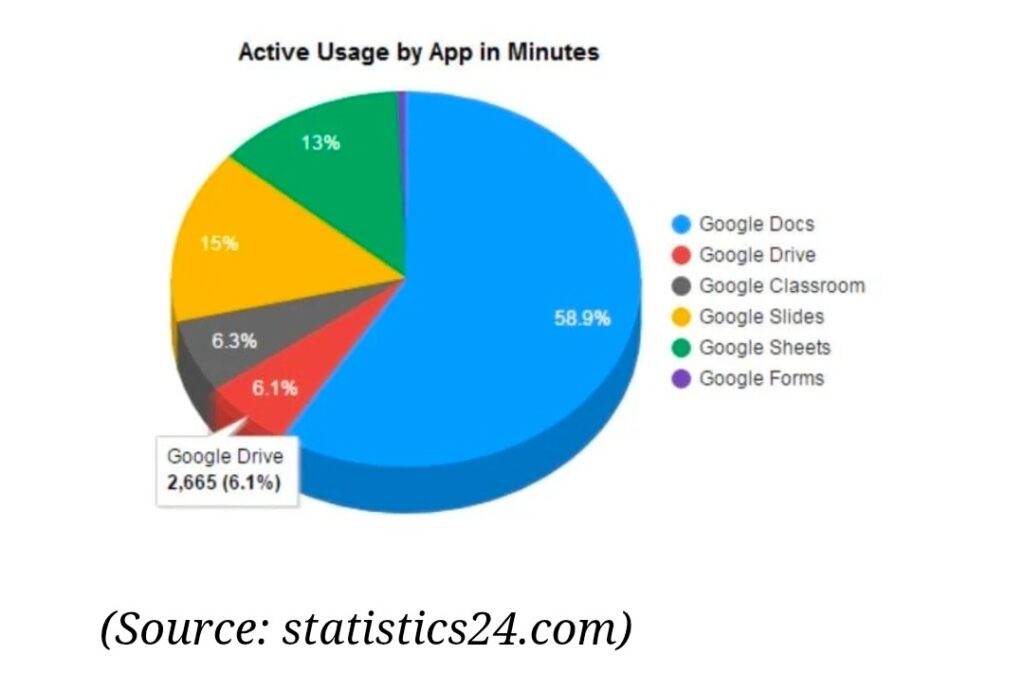
Image Title: 2025 Data of Google Apps Usage (Source:ElectroIQ)
Real Life Users of Google Drive
While majority end users do end up preferring Google Drive due to it being more affordable thus far, the industries that dominate in usage are ‘education, marketing and research’. (Source: 6Sense)
What Makes Dropbox Different from Other Cloud Storage Services?
Dropbox is known for its fast file synchronisation and streamlined file-sharing capabilities. It built its reputation around reliable syncing technology long before many competitors entered the market. Important aspects for comparison:
Dropbox Key Features
- Industry-leading file synchronisation
- Simple file sharing
- Smart folders
- Large file transfers
- Version history
- Strong third-party integrations
Dropbox reports that over 700 million registered users trust the platform for storage and collaboration. (Source: Dropbox)
Dropbox Storage Plans
Dropbox provides a lower offering of 2 GB free storage, while its 2 TB and higher storage requires premium paid plans. For office solutions, it also offers business-focused plans for teams.
Who Should Use Dropbox?
Again this can be driven by personal choice, however, Dropbox is deemed ideal for:
- Creative professionals who regularly share large files
- Photographers collaborating with clients
- Agencies working across multiple operating systems
- Teams that prioritise reliable file synchronisation
- Users seeking a simple and consistent file management experience
Though its low free storage offering may seem contradictory to its actual users, this perception does not reveal the whole story.
- Dropbox is frequently linked with photographers, video editors and other creative professionals, not because it provides the most storage space, but because it has long been recognised for dependable file synchronisation, consistent performance across operating systems and straightforward file-sharing capabilities.
- While Google Drive and OneDrive often deliver more storage for the price, Dropbox has traditionally focused on refining the file management experience itself.
- Its reputation has been built on several strengths, including reliable synchronisation across devices, strong cross-platform support, efficient handling of large files, intuitive sharing features and broad integration with professional productivity and creative applications.
- Example: A design agency can share large project files with clients while maintaining version control.
- However, this does not mean Dropbox is automatically the best choice for every creative workflow.
- For example, a freelance photographer who regularly exchanges files with clients may appreciate Dropbox’s streamlined sharing tools, organised file structure and dependable synchronisation across multiple devices.
- By contrast, a videographer managing tens of terabytes of footage may find that storage costs increase rapidly over time, making specialised archival or backup solutions a more cost-effective option.
- Similarly, a content creator already working within Google Workspace may benefit more from Google Drive’s collaboration tools, powerful search capabilities and seamless integration with the broader Google ecosystem.
- Meanwhile, production teams and businesses that rely heavily on Microsoft 365 may find OneDrive a more practical solution due to its inclusion in many Microsoft subscriptions, attractive value at scale and close integration with applications such as Word, Excel and PowerPoint.
Ultimately, the suitability of a cloud storage platform depends less on a user’s profession and more on their workflow, storage requirements, budget and preferred productivity ecosystem.
Dropbox’s Market Standing
Key insights into Dropbox’s 2026 market performance until now (Source: 6Sense):
- While Dropbox faces intense competition from technology giants such as Google and Microsoft, it remains a widely used file-sharing platform among businesses worldwide. Industry data indicates that more than 141,000 organisations rely on Dropbox for file storage and collaboration purposes.
- Its strongest presence can be seen in the United States, followed by the United Kingdom and Germany, suggesting particularly high adoption in mature business and enterprise markets.
- Although Dropbox’s market share in the broader file-sharing and storage sector is estimated at around 3.27%, its continued popularity demonstrates that many organisations still value its synchronisation capabilities, cross-platform reliability and streamlined file management experience.
Real Life Users of Dropbox
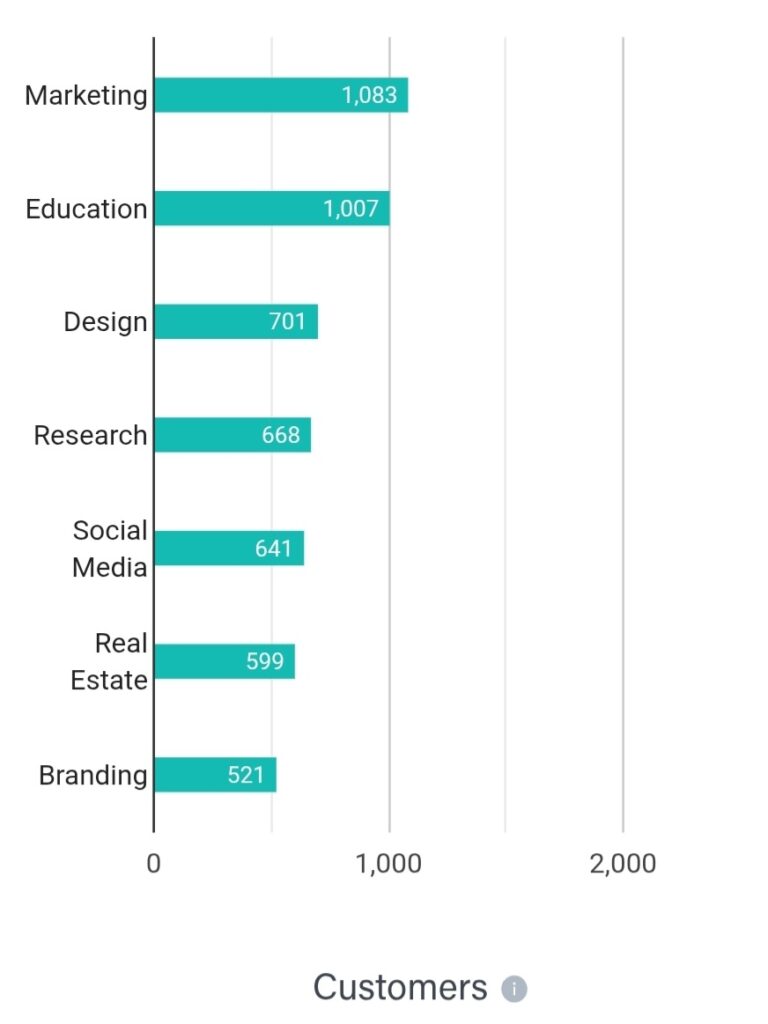
Though Dropbox may involve higher costs in comparison to Google and other cloud storage providers, marketing, education and design industries are the top industries that Dropbox finds its users in, as seen below. (Source: 6Sense)
How Does Microsoft OneDrive Work with Microsoft 365?
Microsoft OneDrive is a cloud storage service integrated with Microsoft 365 and Windows devices. It comes pre-installed on most Windows computers, making adoption extremely simple for Microsoft users. Some important points to note here:
OneDrive Key Features
- Deep Windows integration
- Microsoft Word, Excel and PowerPoint support
- Personal Vault security feature
- Ransomware recovery options
- File-on-demand technology
OneDrive Storage Plans
Microsoft currently provides a 5 GB free storage, 100 GB standalone plan and 1 TB storage with Microsoft 365 Personal. Up to 1 TB per user can be availed with Microsoft 365 Family plans. (Source: Microsoft)
Who Should Use OneDrive?
Many businesses adopt OneDrive because it integrates closely with the Microsoft tools and services they already use on a daily basis. Rather than standing out solely for its storage capabilities, its key strength lies in how naturally it connects with Windows devices and Microsoft 365 applications, enabling a more unified digital workspace.
Consequently, OneDrive may be a strong fit for:
- Windows users looking for seamless file access and synchronisation.
- Professionals who regularly work with Word, Excel and PowerPoint.
- Small businesses seeking a combined productivity and cloud storage solution.
- Organisations that manage their operations through Microsoft 365 tools and services.
For many users, the value of OneDrive extends beyond cloud storage itself. Its ability to integrate smoothly with existing Microsoft-based workflows can simplify collaboration, document management and everyday productivity while reducing the need for additional software platforms. For example, a financial consultant working primarily in Excel and Word benefits significantly from OneDrive’s seamless integration.
OneDrive’s Market Standing
Although OneDrive operates in a highly competitive market, it currently accounts for an estimated 0.78% share of the document management sector. While the number may seem meager, it is still sizable given its compatibility to the Microsoft ecosystems mainly. (Source: 6Sense)
- Managed service providers form the largest group of OneDrive users, followed by businesses focused on project management and cloud services.
- This trend suggests that many organisations view OneDrive not merely as a storage platform, but as an extension of their existing Microsoft-powered workflow.
Real Life Users of OneDrive
Industry data indicates that managed service providers represent the largest segment of OneDrive users, followed closely by organisations specialising in project management and cloud services. This pattern reflects OneDrive’s appeal among businesses that require continuous collaboration, document sharing and integration with productivity tools.
How Secure Are Google Drive, Dropbox and OneDrive?
All three services claim to provide strong security protections including encryption and multi-factor authentication.
However, security features differ slightly, as below, without going to technical details:
- Google Drive emphasises Google Account security.
- Dropbox focuses on secure file sharing and version recovery.
- Among OneDrive’s security offerings are ransomware recovery tools and Personal Vault, an extra-protected storage area that requires additional verification for access.
Despite the security features, the recent innumerable security breaches across cloud storage platforms are difficult to ignore. How important is security over storage?
Security, Privacy and Data Ownership: Looking Beyond Storage Space
When comparing cloud storage services, many people focus on storage limits, pricing and collaboration features. But for most users, the more important question is much simpler – can this platform be trusted with personal photographs, financial records, work documents and other sensitive information? There is more to the decision than simply comparing security features. Privacy and data ownership are equally important considerations in choosing your cloud storage provider.
Security: How Well Are Your Files Protected?
Google Drive, OneDrive and Dropbox employ multiple layers of protection to safeguard user accounts and stored files, as discussed earlier. Features such as encryption, two-factor authentication, account recovery options and suspicious login alerts help reduce the risk of unauthorised access.
That said, no cloud storage provider can completely protect an account that relies on weak passwords or poor security practices. Users who enable additional security measures and regularly review account activity are far better positioned to keep their data safe.
Yes, they are ‘far better’ positioned, but not completely immune to cybersecurity attacks. So far, there has been no foolproof cloud storage provider. Therefore, it is equally important to exercise discretion while uploading ultra-sensitive data online.
Privacy: Who Can Access Your Information?
Security and privacy are often treated as the same thing, but they address different concerns.
- Security focuses on preventing criminals and unauthorised users from accessing your files.
- The question of privacy begins after your files reach the cloud, focusing on how that information is managed, analysed and retained by the service provider.
- Mainstream cloud storage services offer strong security protections, but they are also designed to provide convenience, search functionality, file recovery and other advanced features.
- In many cases, this means the provider retains a degree of control over how data is managed within its ecosystem.
- For most users, this balance between convenience and privacy is perfectly acceptable. Those handling highly confidential information, however, may wish to investigate services that offer stronger privacy-focused controls.
Another black hole that exists in this arena is what do service providers do with all the data? This is where we need to exercise caution while sharing private data via cloud storage systems.
Your Data Does Not Exist Only in the Cloud
A rarely discussed aspect while zeroing on your cloud storage platform – another common misconception is that files stored in the cloud exist only on remote servers.
- In reality, cloud storage services often create temporary files, cached content, synchronisation records and local copies on the devices used to access them.
- These processes help files load faster and remain synchronised across devices, but they also mean that protecting your computer, smartphone and tablet is just as important as protecting your cloud account.
Even the most advanced cloud protections can be rendered ineffective when an attacker gains control of the device being used to access the account.
Finding the Right Balance
No cloud storage platform can maximise security, privacy, convenience and collaboration simultaneously.
- Every provider makes different trade-offs. For some users, seamless collaboration and intelligent search tools will be the priority.
- Others may prioritise stronger privacy safeguards, enhanced account security or the flexibility to avoid becoming tied to a single technology provider.
A lengthy list of capabilities does not automatically translate into the right cloud storage solution for every user. It is the one that provides a level of security, privacy and convenience that matches the way you work and manage your digital information.
Why Should Cloud Storage Reliability Be Considered?
Protecting data involves more than safeguarding it from cyber threats. Equally important is ensuring that your files remain accessible whenever you need them.
A discussion of cloud storage reliability would be incomplete without acknowledging the service outages that have periodically affected major providers in recent years.
- Although cloud storage providers invest heavily in infrastructure and redundancy measures, temporary service interruptions can still occur.
- Regardless of the provider chosen, users should recognise that temporary service disruptions can sometimes interfere with file access and syncing.
- For casual users, a short disruption may have little impact.
- For organisations, distributed teams and professionals working under tight deadlines, even short-lived service interruptions can disrupt ongoing work, hinder collaboration and affect overall productivity.
- For this reason, reliability should be evaluated alongside security, privacy and storage capacity when comparing cloud storage solutions.
- Many organisations also maintain secondary backups or alternative recovery options to minimise the risks associated with unexpected service disruptions.
In the end, an effective cloud storage solution should do more than safeguard information from threats; it should also ensure that users can access their files dependably whenever they need them.
The Differences That Matter in Daily Use
At first glance, Google Drive, Dropbox and OneDrive appear remarkably similar. Despite their differences, they all provide the core capabilities expected from modern cloud storage, including online file storage, cross-device synchronisation and file-sharing functionality. However, the differences become much more noticeable once they become part of your daily workflow.
- Google Drive places a strong emphasis on collaboration, intelligent search and integration with Google’s broader ecosystem. Users who regularly work with Google Docs, Sheets and Gmail may find that everything works together naturally. On the other hand, this deep integration may be less appealing to those who prefer a more independent file storage solution.
- OneDrive is closely tied to Microsoft 365 and Windows. For users who spend much of their day in Word, Excel and PowerPoint, it often feels like a natural extension of the Microsoft environment. However, its advantages become less pronounced for users who primarily work outside the Microsoft ecosystem.
- Dropbox takes a different approach. Rather than building an extensive productivity ecosystem, it focuses on reliable file synchronisation, cross-platform consistency and straightforward file management. Many users in creative fields value Dropbox’s straightforward approach to file management, though some may prefer platforms that offer a broader range of built-in productivity and collaboration tools.
Ultimately, the choice is less about which platform is objectively superior and more about which one aligns with the way you work. Google Drive excels at collaboration, OneDrive shines within Microsoft environments and Dropbox prioritises dependable file management. Understanding these differences is often more valuable than comparing storage limits alone.
The Real Difference: Which Cloud Storage Fits Your Daily Workflow?
Most cloud storage comparisons focus on storage limits, pricing plans and feature checklists. While these factors matter, they rarely determine whether you will actually enjoy using a platform every day. The biggest mistake people make when choosing cloud storage is comparing storage space instead of comparing daily workflow.
A platform that looks perfect on paper may become frustrating if it does not fit the way you work. A practical case – a student collaborating on assignments has very different needs from a photographer or a graphic designer managing thousands of images, or a business team handling spreadsheets and reports.
The following practical scenarios illustrate how different cloud storage platforms may suit different user requirements and working styles.
Which Cloud Storage Service Fits Different Users?
| USER TYPE | RECOMMENDED SERVICE | WHY IT COULD WORK |
| Students | Google Drive | Easy collaboration, generous free storage and seamless document sharing |
| Windows Users | OneDrive | Deep integration with Windows and Microsoft 365 |
| Freelancers | Google Drive or Dropbox | Strong collaboration and easy client file sharing |
| Photographers and Video Creators | Dropbox | Reliable synchronisation and file organisation tools |
| Business Teams | Google Drive or OneDrive | Depends on whether the organisation uses Google Workspace or Microsoft 365 |
| Families | Google Drive or OneDrive | Shared storage options and device integration |
| Privacy-Conscious Users | Consider specialised encrypted providers | Standard consumer cloud storage prioritises convenience over zero-knowledge privacy |
Hidden Trade-Offs Most Cloud Storage Comparisons Ignore
Choosing a cloud storage service involves more than comparing storage limits and monthly fees. Many of the factors that shape your long-term experience are rarely mentioned in marketing materials. Uncovering some here:
Free Storage Is Not Always as Generous as It Appears
Google Drive offers one of the largest free storage allocations among major providers. However, that storage is shared across Google Drive, Gmail and Google Photos. For users who receive large email attachments or regularly back up photos, available storage can disappear faster than expected.
Similarly, Dropbox’s free plan is often enough for testing the platform but can feel restrictive for long-term use, particularly when working with media files.
Ecosystem Dependence Can Become a Long-Term Commitment
Cloud storage rarely operates in isolation, often working alongside the software people rely on throughout the day.
- Google Drive works best when combined with Gmail, Google Docs, Sheets and other Google services.
- OneDrive becomes significantly more valuable when paired with Microsoft 365 and Windows devices.
- Greater integration often brings greater convenience, but it can also make migrating to a different platform more complex as workflows become increasingly tied to a specific ecosystem.
Search Quality Varies More Than Most Users Realise
Finding a file is often more important than storing it.
- Google Drive has developed a reputation for powerful search capabilities, helping users locate files using filenames, document content and, in some cases, text contained within images.
- By comparison, other platforms generally rely more heavily on traditional file names, folder structures and metadata.
- For users managing thousands of files, search quality can become a surprisingly important productivity advantage.
Why Ease of Use and Privacy Do Not Always Align
Cloud storage providers use encryption and multiple security measures to protect user data. However, standard consumer cloud storage is not the same as zero-knowledge encrypted storage.
- In simple terms, convenience-focused cloud storage services retain the technical ability to process or analyse stored content under specific circumstances.
- This helps power features such as search, malware detection and content management, but it also means privacy-conscious users may wish to explore specialised encrypted alternatives.
Sharing Permissions Can Create Unintended Risks
Modern cloud storage platforms make sharing files remarkably easy. However, ease of sharing can sometimes increase the risk of accidental oversharing.
- A document that is intended for one colleague can occasionally end up accessible to a wider audience if sharing settings are configured incorrectly.
- Before sharing sensitive information, it is always worth double-checking permissions and access settings.
These trade-offs are important to consider when choosing the best cloud storage for yourself.
Is Free Cloud Storage Slowly Disappearing?
For years, cloud storage providers competed fiercely by offering generous amounts of free storage. The goal was simple – attract users, encourage them to store more files and eventually convert them into paying subscribers. Today, however, the industry appears to be moving in a different direction.
- While free cloud storage has not disappeared, it is becoming increasingly clear that storage space is no longer the primary battleground.
- Google Drive, OneDrive and Dropbox all continue to offer free plans, but these free tiers are often designed as entry points into much larger ecosystems of products and services.
- As discussed earlier in this article, recent reports have also suggested that Google has experimented with offering some newly created accounts only 5 GB of storage initially, with the full 15 GB unlocked after account verification.
- Although the test appears limited, it reflects a wider trend across the technology industry: companies are placing greater emphasis on subscriptions, ecosystem integration and AI-powered services than on expanding free storage allowances.
This transition raises an important question for consumers. When choosing a cloud storage provider, should free storage still be the deciding factor? The answer may be less straightforward than many people assume.
- A student collaborating on assignments may gain more value from Google Docs integration than from a few extra gigabytes of storage.
- A business professional may benefit more from Microsoft 365 compatibility than from a larger free plan.
- A creative professional managing large media files may prioritise reliable synchronisation and workflow efficiency over free storage limits.
- The reality is that cloud storage platforms are no longer just storage platforms. They have evolved into productivity ecosystems.
- As artificial intelligence, collaboration tools and subscription bundles become increasingly important, the future of cloud storage may depend less on who offers the most free space and more on who provides the most useful overall experience.
For users, this means looking beyond the headline storage figure.
How Do You Choose the Right Cloud Storage Platform for Your Needs?
Choosing a cloud storage platform involves evaluating storage capacity, pricing, security, collaboration features and ecosystem compatibility. Here is a guideline that will help you make an informed choice:
- Estimate how much storage you actually need.
- Identify which productivity ecosystem you already use.
- Evaluate collaboration requirements.
- Compare pricing plans carefully.
- Taking advantage of complimentary plans allows you to evaluate the platform’s features, usability and compatibility before upgrading to a paid tier.
Can You Use Multiple Cloud Storage Services Together?
Yes, many users combine multiple cloud storage platforms. One could use Google Drive for collaboration, Dropbox for large file sharing and OneDrive for Microsoft Office files.
This approach provides flexibility and reduces dependence on a single provider. Though it may trigger additional spending.
The Greatest Storage System Ever Created
The right choice of a cloud storage ultimately depends on your devices, workflow requirements and preferred productivity ecosystem. By carefully assessing your needs and exploring available options, you can select the cloud storage platform that best supports your digital life. Among the cloud storage platforms, there is no universal winner.
However, this discussion raises an intriguing question. If human beings have created technologies capable of storing vast amounts of information, what serves as the ultimate repository of our own experiences?
Our soul itself functions as a far more extraordinary storehouse of information than any cloud platform ever could. It carries the impressions of actions, experiences and journeys accumulated across lifetimes. It knows its true origin and its relationship with the Supreme Creator.
If that knowledge already exists within us, why do we still remain unaware of it? Why do we remember countless details of our present life, yet remain disconnected from the deeper truths of our own existence?
The Cloud Can Store Data, Not Purpose
Jagatguru Tatvdarshi Sant Rampal Ji Maharaj explains that this forgetfulness is not accidental. It belongs to a carefully constructed illusion designed to keep souls distracted from their true purpose.
Sant Rampal Ji Maharaj reveals that the cloud that shields this vast repository of our memories, experiences and our true origin is our mind – an invisible weapon of Kaal Brahm (Satan). Kaal has set the mind as an antithetical element to the soul. This is also why many times the soul and mind do not agree.
Sant Rampal Ji Maharaj’s spiritual wisdom reveals the reasons behind the soul’s separation from its true self and illuminates the path to restoring that lost consciousness.
Sant Rampal Ji Maharaj, the sole Tatvdarshi Sant (Enlightened Saint) of our times, has revealed the identity of the Supreme Creator, Supreme God Kabir, as outlined in the sacred scriptures of multiple religions, yet hidden in plain sight from a world captivated by material progress.
While humanity pushes the boundaries of science, innovation and technology, it continues to overlook the knowledge most essential to human life. Science can explain how we live. Technology can improve how we live. But neither can answer why we live.
The greatest challenge facing humanity today is not a lack of innovation, but a lack of understanding of its true purpose. No matter how extraordinary human achievements may appear, they can never offer complete fulfilment if the fundamental purpose of life remains undiscovered.
To understand how souls became trapped in the deceptive domain of Kaal Brahm, why this cycle of suffering continues, and how one can return to the eternal abode of the Supreme Creator, listen to the enlightening spiritual discourses of Jagatguru Tatvdarshi Sant Rampal Ji Maharaj:
In order to explore yourself and gain deeper insights you can visit on His website www.jagatgururampalji.org or can watch His spiritual sermons on ‘Sant Rampal Ji Maharaj’ YouTube channel.
FAQs on Google Drive vs Dropbox vs OneDrive
Q1) How do you determine which cloud storage platform suits your needs?
Answer: The right choice depends on factors such as device compatibility, collaboration requirements, storage expectations and the digital tools you use most frequently.
Q2) What factors should be considered when comparing cloud storage services?
Answer: Storage limits, ecosystem integration, security measures, sharing capabilities, reliability and pricing all play a role in selecting a suitable cloud storage solution.