

Today, the 1980s AI photo trend is gaining attention on instagram where users can convert their pictures into retro style bollywood portraits using ChatGPT.
The 1980s is considered as one the most visually distinctive decades in modern history. With the colorful fashion, bold hairstyles, vintage cars, cassette players, and neon-lit streets, the decade developed an aesthetic vibe that continues to influence photography, fashion, cinema, and digital art.
With the help of AI image generation tools and carefully written 1980s photo prompts for ChatGPT, one can easily recreate and produce images that feel authentic instead of using retro filters.
1980s Visual Style: A Quick Understanding
For every successful 1980s image generation, an understanding of the decade’s visual character and nostalgic atmosphere is required. Photography from this decade had a distinct appearance and characteristics. The film grain, imperfect exposure, natural shadows, and soft highlights contribute to the character of photographs.
The 1980s era was also known for vibrant colors, The frequently highlighted colors in clothing, advertisements, and interiors includes electric blue, hot pink, purple, red, and bright yellow. In capturing urban scenes, neon lighting was used and whereas in fashion and domestic scenes, pastel colors were common.
Essential Elements of an 1980s Photo Prompt
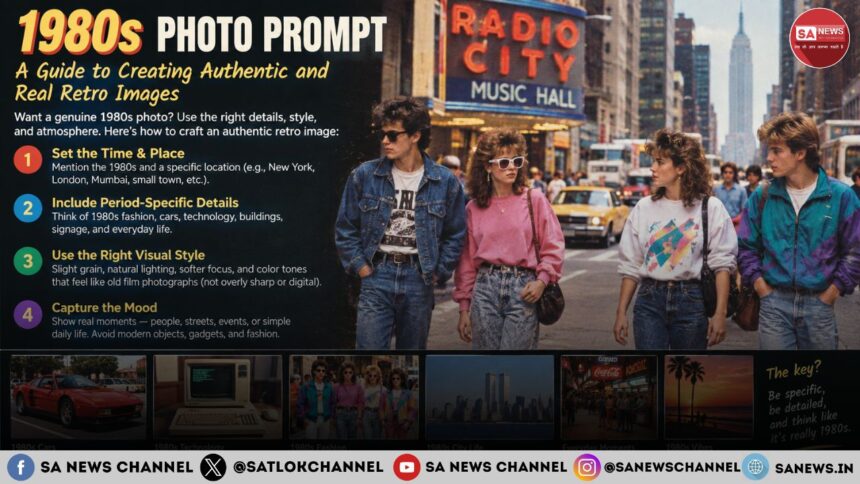
A strong AI photo prompt describes not only the subject but also the characteristics that make the image appear as it was originally captured during the 1980s.
A detailed photo prompt is divided in several components as below:
- The first component is the Subject. Decide what should exactly appear in the photograph. For example, a family posing beside a vintage automobile, a musician performing at a small nightclub.
- The next component is the Location. The specific environment/ location includes a shopping mall, a record store, a bedroom filled with posters, and an American street.
- Another element is clothing. The denim jackets, high waisted jeans, tracksuits, oversized sweatshirts, and athletic sneakers can instantly bring you to the 1980s atmosphere. The common hairstyles were voluminous curls, teased hair and side swept styles can strengthen the look.
6 ChatGPT 1980s AI Photo Prompts
80s Arcade: Convert this photo into an authentic 1980s arcade scene with neon lighting, vibrant colors and classic games.
Vintage Car: Using this photo, create a stylish 1980s photo of the person posing beside a classic vintage sports car at sunset. Add the vibrant colors to make it real.
Classic Bollywood Heroine Portrait: Transform this photo into a classic 1980s heroine portrait styled with clothing, and hairstyle of the 1980s period.
Vintage Indian Film Magazine Cover: Convert this photo into a 1980s Indian bollywood film magazine cover by keeping the person’s face and styling him as a bollywood star with clothing, hairstyle and makeup. Also add colorful studio background, dramatic lighting and a fictional magazine layout.
1980s Wedding Album Photo: Turn this photo into an authentic 1980s indian wedding album photograph by adding period appropriate traditional clothes, jewellery, background wedding scene with floral decorations. Make it look like a photo clicked in the 1980s wedding era.
1980s Music Star: With this photo, create a glamorous 1980s music star photograph with bold fashion and studio lighting.
1980s AI Photo: Important Points to be Noted
- Choose the right photography style. Clearly specify in your prompt the requirements such as slightly faded colors, realistic skin tones, motion blur, and imperfect exposure.
- The background is extremely important in historical image creation prompts. Specifying the authentic background details like for an arcade scene, include classic arcade cabinets, CRT televisions and colorful illuminated signs.
- Another important point is lighting and color. Lighting can dramatically influence an 1980s image. A useful photo prompt should describe the required color treatment like instead of saying “vintage”, use terms such as “faded red”, “warm skin tones”, and “natural film grain”.
Before sharing or posting the AI generated image, users are advised to carefully check the small details like faces, hands, text in the background as AI generated portraits can sometimes change this. Also, never upload the photos that show sensitive documents, or transform pictures of people without their consent.