

Most PC users already know they need antivirus protection, but many assume all free antivirus programs offer the same level of security. The reality is that malware detection rates, system impact and security features vary significantly between providers. In this guide, you’ll discover the best free antivirus software available today, how they compare and which solution is best for your specific needs.
- Best Free Antivirus Software in 2026 Highlights
- What Is Antivirus Software and How Does It Protect Your PC?
- Why Is Antivirus Protection Still Important in 2026?
- Is Free Antivirus Software Good Enough for Most Users?
- How We Evaluated the Best Free Antivirus Software
- Which Free Antivirus Software Offers the Best Malware Protection?
- Microsoft Defender
- Bitdefender Antivirus Free
- Avast Free Antivirus
- AVG AntiVirus Free
- Avira Free Security
- Malwarebytes Free
- Panda Free Antivirus
- Sophos Home Free
- How Do Free Antivirus Programs Compare to Paid Antivirus Solutions?
- The Hidden Limitations of Free Antivirus Software
- Why Malwarebytes Free Is Best Used as a Second Scanner
- What to Do If Your Antivirus Finds Malware
- Why Free Antivirus Is Not Enough by Itself
- Free Antivirus vs Malware Removal Tools: What Is the Difference?
- Can You Use More Than One Antivirus Program at the Same Time?
- Best Free Antivirus Recommendations by User Type
- What Additional Security Measures Should You Use Alongside Antivirus Software?
- The Ultimate Reflection of Antivirus in Our Lives
- FAQs on Best Free Antivirus Software in 2026
Best Free Antivirus Software in 2026 Highlights
- Antivirus software protects computers from malware, ransomware, spyware, phishing attacks and other digital threats.
- Free antivirus software provides essential protection without requiring a subscription, although advanced features are usually reserved for paid plans.
- Microsoft Defender delivers strong built-in protection for many Windows users at no additional cost.
- Independent testing results remain one of the most reliable indicators of antivirus effectiveness.
- System performance impact varies between antivirus programs and should be considered before installation.
- Layered cybersecurity provides stronger protection than antivirus software alone.
- Regular updates and safe browsing habits remain essential even when antivirus software is installed.
What Is Antivirus Software and How Does It Protect Your PC?
Antivirus software is a security application designed to detect, block and remove malware, ransomware, spyware and other digital threats from a computer.
- Antivirus programs continuously scan files, applications, downloads, emails and websites for suspicious activity.
- Modern antivirus solutions use signature databases, behavioural analysis, machine learning and cloud intelligence to identify threats before they can damage your system.
- Real-time protection involves continuously monitoring files, downloads, applications and websites for suspicious activity before threats can execute.
- If you download an infected file disguised as a PDF, a modern antivirus program can identify the malicious code before the file opens.
Antivirus vs Cybersecurity Tools
Antivirus software focuses on malware detection and removal, while cybersecurity tools provide broader protection across multiple threat categories. A complete cybersecurity setup may include antivirus software, password managers, VPN services, backup solutions, multi-factor authentication and firewall protection.
How Malware Infects Computers
Malware infections typically occur through malicious downloads, phishing emails, compromised websites and software vulnerabilities. Attackers often disguise malware as software installers, invoices, shipping notifications or browser updates.
Why Is Antivirus Protection Still Important in 2026?
Antivirus protection remains important because cybercriminals continue to develop increasingly sophisticated malware, phishing, spyware and ransomware attacks.
According to Microsoft’s security guidance, modern threats increasingly use cloud services, automation and AI-assisted techniques to target users. Additionally, AV-TEST evaluated dozens of Windows security products during 2025 and 2026, demonstrating that malware remains an active threat requiring ongoing protection.
Common Threats Facing PC Users
Important examples:
- Malware: Malware is malicious software designed to damage systems, steal information or gain unauthorised access. Examples include Trojans, worms, rootkits and botnets.
- Phishing: Phishing attacks trick users into revealing passwords, banking information or personal data. For example, a fake Microsoft login page can appear identical to the real website.
- Ransomware: Ransomware protection helps prevent malicious software from encrypting files and demanding payment for their recovery. Ransomware attacks remain one of the most financially damaging cyber threats facing individuals and businesses.
- Spyware: Spyware secretly monitors user activity and collects sensitive information without consent. Examples include keyloggers and browser tracking software.
Is Free Antivirus Software Good Enough for Most Users?
Free antivirus software is good enough for most users who need basic malware protection and practice safe online behaviour.
Notably, Microsoft recently stated that Microsoft Defender provides sufficient protection for many everyday Windows users, provided systems remain updated and users follow safe computing practices.
However, free antivirus software often lacks:
- Advanced ransomware controls
- Identity theft monitoring
- VPN services
- Dark web monitoring
- Advanced parental controls
- Dedicated customer support
When Free Antivirus Is Enough
Free antivirus software is often suitable for students, home users, casual web browsers, budget-conscious users and remote workers with basic security needs, to name some.
When Paid Antivirus Makes Sense
Paid antivirus becomes worthwhile if you:
- Store sensitive business data
- Manage multiple family devices
- Require identity monitoring
- Need VPN protection
- Want advanced ransomware defence
How We Evaluated the Best Free Antivirus Software
This selection of the best free antivirus software was evaluated using malware detection rates, system performance impact, usability, feature availability and independent lab testing. We will take the help of a standard for this.
According to AV-TEST (a standard), products are assessed across three major categories – Protection, Performance and Usability. Products can achieve a maximum score of 18 points.
Evaluation Criteria
- Malware Detection: Detection capability measures how effectively antivirus software identifies and blocks threats. AV-Comparatives and AV-TEST regularly conduct malware protection evaluations using thousands of real-world samples.
- Performance Impact: Performance impact measures how much an antivirus slows down a computer during normal use. AV-Comparatives specifically evaluates how security software affects Windows system performance.
- Ease of Use: Ease of use determines how easily users can install, configure and manage protection settings. This factor is especially important for beginners.
These criteria will also help you to independently understand and evaluate which free antivirus you would like to lean on the most.
Also Read: Why Cybersecurity is the Most Promising Career Choice in 2025
Which Free Antivirus Software Offers the Best Malware Protection?
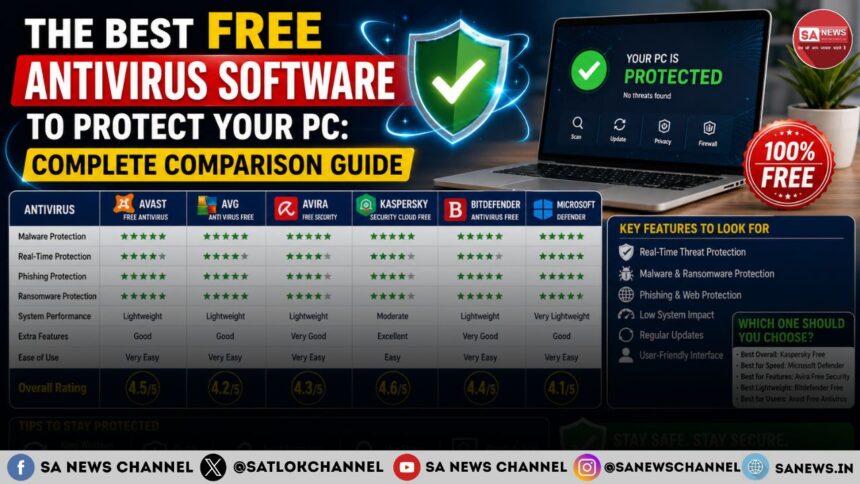
The best free antivirus software combines strong protection, low performance impact and ease of use. Here are some:
Microsoft Defender
Microsoft Defender is the built-in antivirus solution included with modern versions of Windows and provides real-time malware protection by default.
- Pros: Free and pre-installed; strong independent test performance; seamless Windows integration and regular updates
- Cons: Fewer advanced features and limited customisation
It is best for most Windows users. It is also one of the most valued antivirus in the market.
Bitdefender Antivirus Free
Bitdefender Antivirus Free is known for strong protection and exceptionally low system impact. According to independent comparisons, Bitdefender delivers excellent protection while remaining lightweight and simple to use. It is best for users wanting lightweight protection.
Avast Free Antivirus
Avast Free Antivirus combines strong protection with additional security tools and usability features. AV-Comparatives awarded Avast among its top-rated products in recent testing. It is best for feature-focused users.
AVG AntiVirus Free
AVG AntiVirus Free offers strong malware detection and excellent performance results. Recent AV-Comparatives reports recognised AVG among top-performing consumer security products. It is best for general-purpose protection.
Avira Free Security
Avira Free Security combines antivirus protection with additional privacy and optimisation tools. It is best for users seeking extra utilities.
Malwarebytes Free
Malwarebytes Free excels as a malware removal tool and secondary scanner. It is best for on-demand malware cleanup.
Panda Free Antivirus
Panda Free Antivirus offers cloud-based protection with a beginner-friendly interface. It is best for casual users.
Sophos Home Free
Sophos Home Free focuses on family security and remote device management. It is best for households managing multiple devices.
How Do Free Antivirus Programs Compare to Paid Antivirus Solutions?
Free antivirus software provides essential malware protection, while paid antivirus solutions include advanced security features and broader coverage.
| Feature | Free Antivirus | Paid Antivirus |
| Malware Protection | Yes | Yes |
| Real-Time Protection | Usually | Yes |
| Ransomware Protection | Basic | Advanced |
| VPN | Rarely | Common |
| Password Manager | Rarely | Common |
| Identity Monitoring | No | Often |
The Hidden Limitations of Free Antivirus Software
Free antivirus software is a strong starting point, but it is rarely a complete security system on its own. Most free tools are designed to handle essential virus and malware detection, while more advanced protections are usually kept for paid versions. For example, a free antivirus may scan files and block known malware, but it may not include advanced ransomware recovery, webcam protection, identity monitoring, dark web alerts, unlimited VPN access or full firewall controls.
This does not make free antivirus useless. It simply means users should understand what is included and what is missing before relying on it completely.
Free antivirus software works best when it is treated as a baseline layer of protection. It can help stop common threats, suspicious downloads and known malware, but it should be supported by safe browsing habits, software updates, strong passwords and regular backups.
What Free Antivirus Usually Does Not Include
| Security Feature | Usually Included in Free Antivirus | Usually Included in Paid Antivirus |
| Basic malware scanning | Yes | Yes |
| Real-time protection | Sometimes | Yes |
| Ransomware defence | Limited | Stronger |
| Advanced firewall controls | Rarely | Yes |
| VPN access | Limited or unavailable | Often included |
| Identity monitoring | No | Often included |
| Dark web monitoring | No | Often included |
| Multi-device protection | Limited | Yes |
| Priority customer support | Rarely | Yes |
The main takeaway is simple: free antivirus can protect your PC from many everyday threats, but it should not be mistaken for a full cybersecurity package.
Why Malwarebytes Free Is Best Used as a Second Scanner
Malwarebytes Free is best understood as an on-demand malware removal tool rather than a full replacement for a primary antivirus. It is especially useful when your PC feels slow, behaves strangely, shows pop-ups, redirects your browser or continues acting infected even after your main antivirus scan says everything is fine.
Unlike full-time antivirus software that constantly watches your system in the background, the free version of Malwarebytes is mainly used when you choose to run a scan. This makes it valuable as a second-opinion scanner. One may keep Microsoft Defender active for daily protection and use Malwarebytes Free whenever you want to check whether something has slipped through.
This approach is practical because no single security tool catches everything. A primary antivirus protects your PC continuously, while a secondary scanner can help detect adware, unwanted programs, suspicious browser changes and stubborn malware that may require a deeper cleanup.
Also Read: Ultimate Guide to Remote Work Strategies: Boost Productivity and Well-being
What to Do If Your Antivirus Finds Malware
If your antivirus finds malware, the first step is to stay calm and avoid opening suspicious files, entering passwords or making online payments from that computer. Malware alerts do not always mean your system is destroyed, but they do mean you should act carefully.
Follow these steps:
- Disconnect your PC from the internet if the threat looks serious.
- Let your antivirus quarantine or remove the detected item.
- Restart your computer if the antivirus recommends it.
- Run a full system scan after restarting.
- Use a second scanner such as Malwarebytes Free if the PC still behaves strangely.
- Update Windows and all important software.
- Change important passwords from a clean device.
- Restore affected files from a safe backup if needed.
If the same threat keeps coming back, your PC may have a deeper infection. In that case, avoid downloading random ‘repair tools’ from unknown websites and consider getting help from a trusted technician.
Why Free Antivirus Is Not Enough by Itself
Free antivirus software is important, but it cannot protect you from every type of cyber risk. Many attacks begin with human error rather than a traditional virus file, which means your behaviour matters as much as your software.
An antivirus software may block a malicious attachment, but it may not stop you from typing your password into a convincing fake login page. Similarly, antivirus protection may detect malware, but it cannot recover your family photos, work files, or financial records if you never created a backup.
A stronger PC security, ideally, must setup includes:
- Antivirus protection
- Multi-factor authentication
- Strong and unique passwords
- A password manager
- Regular software updates
- Secure backups
- Safe browsing habits
- Careful email behaviour
Layered security is more reliable than depending on one tool. Antivirus software protects your device, but good security habits protect your identity, files, accounts and money.
Free Antivirus vs Malware Removal Tools: What Is the Difference?
Free antivirus software is designed to prevent and detect threats, while malware removal tools are usually used to clean a system after something suspicious has already happened. For example, Microsoft Defender or Bitdefender Free can protect your PC during everyday use by checking downloads, apps and files. Malwarebytes Free, on the other hand, is often used when you already suspect a problem and want to scan for hidden malware, adware or potentially unwanted programs.
The best approach is not always choosing one tool over another. For many users, the smarter setup is to use one trusted antivirus for real-time protection and one reputable malware removal tool for occasional second-opinion scans.
Can You Use More Than One Antivirus Program at the Same Time?
You should not run two full real-time antivirus programs at the same time because they can conflict with each other, slow down your PC and create confusing security alerts. When two antivirus engines try to inspect the same file at the same moment, your system may become less stable instead of more secure.
However, using one main antivirus with one on-demand malware scanner is usually a safer and more practical setup. The rule is simple: use one real-time antivirus for daily protection and one extra scanner only when needed.
Best Free Antivirus Recommendations by User Type
Different users need different types of protection. The best free antivirus for one person may not be the best choice for another.
| User Type | Best Free Option | Why It Fits |
| Beginner | Microsoft Defender | Already built into Windows and easy to manage |
| Older PC user | Bitdefender Free | Simple and resource-friendly |
| Malware cleanup need | Malwarebytes Free | Useful for manual malware removal scans |
| Everyday home user | Microsoft Defender | Good balance of protection and convenience |
| Feature-focused user | Avast Free or AVG Free | Includes more extras than some basic tools |
| Privacy-conscious user | Avira Free Security | Offers security tools with privacy-focused extras |
The best free antivirus is the one that protects your PC without slowing it down or confusing you. A simple tool that you keep updated is better than a feature-heavy program you do not understand or manage properly.
What Additional Security Measures Should You Use Alongside Antivirus Software?
Layered cybersecurity involves combining antivirus software with strong passwords, software updates, backups and safe browsing practices.
- Enable Multi-Factor Authentication: Multi-factor authentication adds an extra security layer beyond passwords.
- Use a Password Manager: Password managers help create and store unique passwords securely.
- Keep Software Updated: Software updates close security vulnerabilities that attackers frequently exploit.
- Create Regular Backups: Backups provide recovery options if ransomware or hardware failure occurs.
- Practice Safe Browsing: Safe browsing habits reduce exposure to phishing attacks and malicious websites.
- Consider Additional Tools: You may also consider VPN services, browser security extensions and email filtering tools.
The Ultimate Reflection of Antivirus in Our Lives
Technology has transformed the way we live, work and communicate. However, every technological breakthrough seems to create a new challenge alongside it – more connected devices bring more cyber threats, more convenience attracts more sophisticated scams, and stronger software fuels even more advanced attacks. In many ways, technology continually creates the need for even better protection.
Human life follows a similar pattern. We often try to solve one problem only to encounter another because the deeper causes of suffering, fear, greed, anger and attachment remain untouched. Just as antivirus software protects a computer from hidden threats, the authentic spiritual knowledge imparted by a Tatvdarshi Saint protects the soul from the inner vices that repeatedly disturb human life.
Jagatguru Tatvdarshi Sant Rampal Ji Maharaj is the only Enlightened Saint (Tatvdarshi Sant) of our era. His true spiritual wisdom acts as the ultimate protection against the invisible enemies within. While antivirus software safeguards your computer, genuine devotion based on true spiritual knowledge safeguards your life.
Know more about Sant Rampal Ji Maharaj’s path breaking spiritual knowledge by visiting:
Website: www.jagatgururampalji.org
YouTube: Sant Rampal Ji Maharaj
Facebook: Spiritual Leader Saint Rampal Ji
‘X’ handle: @SaintRampalJiM
FAQs on Best Free Antivirus Software in 2026
Q1) Is free antivirus software enough for everyday computer use?
Answer: For many people, free antivirus software provides adequate protection against common online threats.
Q2) Do free antivirus programs stop ransomware attacks?
Answer: Many free antivirus tools can detect ransomware, but stronger anti-ransomware features are often reserved for premium plans.