


Google has introduced Android 17, bringing a range of new features focused on productivity, entertainment, privacy, security and parental supervision. The update is rolling out first to Pixel devices and will reach other eligible Android devices throughout 2026. Alongside new multitasking and gaming capabilities, Android 17 expands Parental Controls beyond Pixel phones and integrates them more closely with Google Family Link, giving families additional tools to manage children’s device use.
- Key Takeaways: Android 17 Features and Parental Controls
- Android 17 Begins Rollout With New Productivity Features
- Screen Reactions Introduced for Easier Content Sharing
- Foldable Gaming Mode Targets Better Gameplay
- Android 17 Expands Parental Controls Beyond Pixel Devices
- Privacy and Security Updates Focus on User Control
- Additional Android 17 Features and Device Improvements
- Broader Focus on Digital Wellbeing
- Android 17 Signals a Wider Push for Family-Focused Features
- The Illusion of Digital Safety and Controls
- Ultimate Security Through True Spiritual Worship
- FAQs on Android 17
Key Takeaways: Android 17 Features and Parental Controls
- Android 17 is rolling out first to Pixel devices, followed by other eligible Android devices throughout 2026.
- Select advanced devices will receive Gemini Intelligence later this summer.
- Android Parental Controls are expanding beyond Pixel devices to all devices running Android 17.
- Google Family Link tools are integrated into a dedicated section within Android settings.
- New multitasking features include Bubbles and Screen Reactions.
- Foldable gaming mode introduces a 50/50 game-view and gamepad layout.
- Android 17 adds new privacy, security and anti-theft protections.
- Google is increasing its US digital wellbeing fund to more than $50 million.
Android 17 Begins Rollout With New Productivity Features
Google has announced Android 17, introducing a suite of features designed to improve productivity, entertainment, security and safety. The update is rolling out first to Pixel devices and will become available on other eligible Android devices throughout 2026.
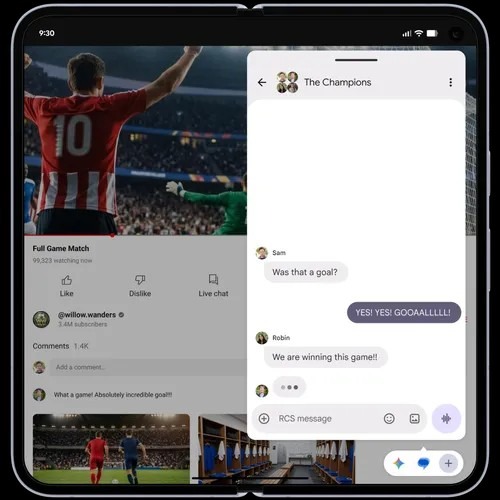
One of the major additions is Bubbles, a multitasking feature that allows users to turn any app into a compact floating window. Users can long-press an app icon to convert it into a bubble that remains accessible while using other applications.
On large-screen devices, bubbles are docked in a dedicated bubble bar at the bottom of the display. Users can switch between apps with a single tap and resize or maximize them to full-screen mode when needed.
Also Read: Samsung S26 Series: The Most Advanced Galaxy AI Flagship Launched
Google said Bubbles can be useful for referencing notes or maps, watching tutorials, checking sports updates and managing multiple tasks simultaneously.
Screen Reactions Introduced for Easier Content Sharing
Android 17 also updates screen recording and annotation tools with a redesigned workflow and a new toolbar.
A new feature called Screen Reactions allows users to record themselves using the device’s selfie camera while simultaneously capturing their phone screen. The feature enables users to share their reactions, thoughts and commentary while interacting with websites, apps or videos without switching between multiple applications.
Foldable Gaming Mode Targets Better Gameplay
Android 17 introduces foldable gaming mode for foldable devices.
The feature uses an optimized 50/50 layout that places the game view on the upper portion of the screen and a dynamic gamepad on the lower section. According to Google, this approach is designed to maximize viewing space and gameplay controls.
The company said foldable gaming mode is enabled in Android 17 and will become available in the coming months. Users employing external controllers will also have access to native controller remapping options.
Google added that memory cleanup has been made more efficient to reduce frame drops and stutters during high-definition gaming sessions.
Android 17 Expands Parental Controls Beyond Pixel Devices
Google has announced that Android Parental Controls will now be available on all devices running Android 17, extending the feature beyond Pixel smartphones.
The company said parental supervision tools and Google Family Link have been brought together within a dedicated section of the Android settings app, making management easier for families.
Parents will be able to:
- Set daily screen time limits
- Create downtime schedules that automatically lock devices
- Restrict app downloads based on content ratings
- Limit or block access to specific applications
Google said these settings are protected by a PIN to prevent unauthorized modifications.
Family Link Features Available Through Integration
Android’s Parental Controls now provide a direct route to Family Link setup.
Family Link includes additional features such as:
| Feature | Purpose |
| School Time | Helps manage device use during school hours |
| Google Play Purchase Approvals | Allows parents to review purchases |
| Location Alerts | Provides location-related notifications |
| Family Management Tools | Offers additional parental supervision options |
Google said the integration is intended to make parental management tools easier to access and use.
Privacy and Security Updates Focus on User Control
Android 17 introduces several privacy and security enhancements.
Users can now grant applications temporary access to their precise location instead of providing permanent access. The update also allows users to share only selected contacts with apps rather than their entire contact list.
Also Read: Google Drive vs Dropbox vs OneDrive: Which Cloud Storage Service Fits Your Workflow?
Google has enhanced the “Mark as lost” feature in Find Hub. Users can lock a missing phone using biometrics, preventing access to information and stopping tracking from being disabled even if a thief knows the device passcode.
Additional security improvements include:
- Enhanced Live Threat Detection
- Improved Advanced Protection mode
- Blocking more suspicious apps and scams
- Fewer PIN guess attempts
- Longer wait times between failed PIN entries
Additional Android 17 Features and Device Improvements
Android 17 also introduces several other changes, including:
- A setting to hide app names on the home screen
- Expansion of Parental Controls to all Android devices running Android 17
- Dedicated volume controls for assistants
- More control over the expanded dark theme
Under the hood, Android 17 introduces app memory limits to ensure applications do not consume excessive RAM. Google said this change is intended to improve overall device performance and battery life.
The company also noted that Pixel devices are receiving additional updates alongside the Android 17 rollout.
Broader Focus on Digital Wellbeing
Google said it is increasing its US digital wellbeing fund to more than $50 million to support healthier technology habits and efforts aimed at tackling social isolation among children and teenagers.
The announcement comes as technology companies continue introducing tools designed to give parents greater oversight of their children’s digital experiences.
At WWDC 2026 earlier this month, Apple announced new parental control features for iOS 27, iPadOS 27 and macOS 27. These include Ask to Browse website approvals, expanded Ask to Buy controls, Time Allowances for screen time management and enhanced communication safety protections. Apple said those features will roll out later this year.
Android 17 Signals a Wider Push for Family-Focused Features
The rollout of Android 17 combines new multitasking, gaming, privacy and security capabilities with broader parental supervision tools. By extending Parental Controls beyond Pixel devices and integrating them with Google Family Link, the update brings family management features to a wider Android ecosystem while introducing new productivity and device management enhancements for users.
The Illusion of Digital Safety and Controls
The rollout of Android 17 brings advanced parental controls beyond Pixel devices, along with sophisticated multitasking, privacy, and gaming features. These tools aim to grant parents greater oversight and provide users with enhanced data security. But while device-level boundaries can restrict app usage, can they truly protect a child’s inner consciousness from moral and spiritual degradation? We constantly invent complex filters to manage external distractions, yet we remain completely helpless against the negative impulses of anger, greed, and anxiety arising directly within the human mind. If technology could fix our internal flaws, why does society continue to face rising unrest?
Ultimate Security Through True Spiritual Worship
Jagatguru Tatvdarshi Sant Rampal Ji Maharaj explains that the ultimate hacker of human consciousness is Kaal Brahm (Satan), who influences the minds of living beings to keep them trapped in a cycle of vices and ignorance. No software update or parental filter can block this unseen force. True and lasting protection is not coded in algorithms, but is found in the scripture-based method of worship granted by a Complete Saint. By adopting the authentic devotion of Supreme God Kabir through Sant Rampal Ji Maharaj, an individual can rise above worldly influences, purify their thoughts, and achieve absolute inner peace and salvation.
Do not let your smartphone remain merely a tool for temporary convenience or digital distraction. Turn it into a bridge to recognize and verify the eternal spiritual truth for your family.
Website: www.jagatgururampalji.org
YouTube: Sant Rampal Ji Maharaj
Facebook: Spiritual Leader Saint Rampal Ji
X (Twitter): @SaintRampalJiM
FAQs on Android 17
1. What is Android 17?
Android 17 is Google’s latest Android operating system update featuring multitasking, gaming, privacy, security and parental control improvements.
2. Which devices will receive Android 17 first?
Android 17 is rolling out first to Pixel devices before expanding to other eligible Android devices throughout 2026.
3. What are Bubbles in Android 17?
Bubbles allow users to convert apps into floating windows for easier multitasking and quicker access while using other applications.
4. How does Android 17 improve parental controls?
Android 17 expands Parental Controls to all supported devices and integrates them directly with Google Family Link.
5. What security upgrades are included in Android 17?
Android 17 adds temporary location sharing, selected contact sharing, enhanced threat detection and stronger anti-theft protections.