



WhatsApp is the most widely used messaging service in India and worldwide. However, today, it is capable of doing much more than just messaging. Keeping up with the ever-changing technological landscape, WhatsApp has crossed over into the personal AI-assistant territory too. In this guide, you’ll discover 10 hidden WhatsApp features that can improve your privacy, save time, organise your chats and completely change how you use the app.
- 10 WhatsApp Hidden Features Highlights
- The Evolution of WhatsApp Features
- What Are Hidden WhatsApp Features?
- Are Hidden WhatsApp Features Important?
- How Do You Lock Specific Chats on WhatsApp?
- How to Enable Chat Lock on Android
- How to Enable Chat Lock on iPhone
- Add an Extra Layer of Protection with Secret Codes
- How Can You Edit Sent Messages on WhatsApp?
- What Is the Message Yourself Feature in WhatsApp?
- Search WhatsApp Chats By Date
- Organise Chats Better with Custom Lists
- How Do You Share HD Photos and Videos on WhatsApp?
- How Can You Improve Privacy on WhatsApp?
- Customise Who Can See Your Activity on WhatsApp
- How Do Disappearing Messages Work on WhatsApp?
- What Are the Best WhatsApp Productivity Features for Professionals?
- Format Your Messages for Better Communication
- What Common Mistakes Do WhatsApp Users Make?
- Are Hidden WhatsApp Features Safe to Use?
- What Should You Explore Next on WhatsApp?
- The Human Contradiction Hidden Inside Modern Communication
- Why Inner Peace Cannot Be Downloaded Through Technology
- FAQs
10 WhatsApp Hidden Features Highlights
- Whatsapp has officially announced on its website that it currently serves more than 3 billion users worldwide. (Source: Whatsapp)
- Out of these 3 billion users, the majority are from India (as of 2026 they are 853.8 million). (Source: World Population Review)
- In the United States of America, not more than 100 million individuals use WhatsApp.
- Hidden WhatsApp features are built-in tools that improve privacy, productivity and communication without requiring third-party apps.
- Chat Lock and custom privacy controls help protect sensitive conversations from unauthorised access.
- Multi-device support allows WhatsApp users to access the same account across phones, tablets and computers simultaneously.
- Message editing, disappearing messages and HD media sharing have now improved everyday communication quality and convenience.
- WhatsApp productivity features aim to reduce clutter, save time and make important conversations easier to manage.
- Two-step verification and silencing unknown callers have significantly improved WhatsApp account security.
- Regularly exploring WhatsApp settings can help users discover useful tools released through app updates.
The Evolution of WhatsApp Features
For years, WhatsApp was viewed as a simple messaging app. But that is rapidly changing. WhatsApp is gradually transforming into a smarter communication platform focused not only on messaging, but also on privacy, digital identity, productivity, media handling, and seamless usage across multiple devices.
What makes this transformation especially important is that most users still use only a fraction of WhatsApp’s actual capabilities. Many of the app’s most powerful tools remain buried inside settings menus, hidden behind updates, or quietly rolling out through beta features.
And despite this, WhatsApp has been successfully adding to its user counts each year significantly. India, Brazil, Indonesia, USA, Philippines and Mexico are the top users of WhatsApp in this particular order, ranking from one to six, as of 2026.

Image Source: World Population Review
This article offers easy-to-understand insights about the hidden features of WhatsApp to even help new users navigate the renewed cosmos of WhatsApp.
What Are Hidden WhatsApp Features?
WhatsApp has innumerable features but some features are not immediately visible in sight. Such features are known as hidden features.
Hidden WhatsApp features are built-in tools and settings that are hidden tricks to help boost privacy, productivity and communication without requiring external apps. Most of these features already exist inside WhatsApp, but many users never discover them because they are buried inside menus and settings.
It is important to reiterate that WhatsApp is no longer just a basic messaging app. WhatsApp now serves over 3 billion users globally across more than 180 countries (Source: Whatsapp). WhatsApp’s enormous global user base has encouraged Meta to steadily introduce more sophisticated features focused on privacy, media quality, chat management, and seamless multi-device connectivity.
For example, many users know how to send messages and make calls, but far fewer people know they can:
- Lock individual chats
- Edit sent messages
- Use WhatsApp across multiple devices
- Silence spam callers
- Automatically delete conversations
- Send HD-quality media
At the same time, these tools are especially valuable for professionals, students, parents, entrepreneurs and remote workers who rely heavily on WhatsApp daily.
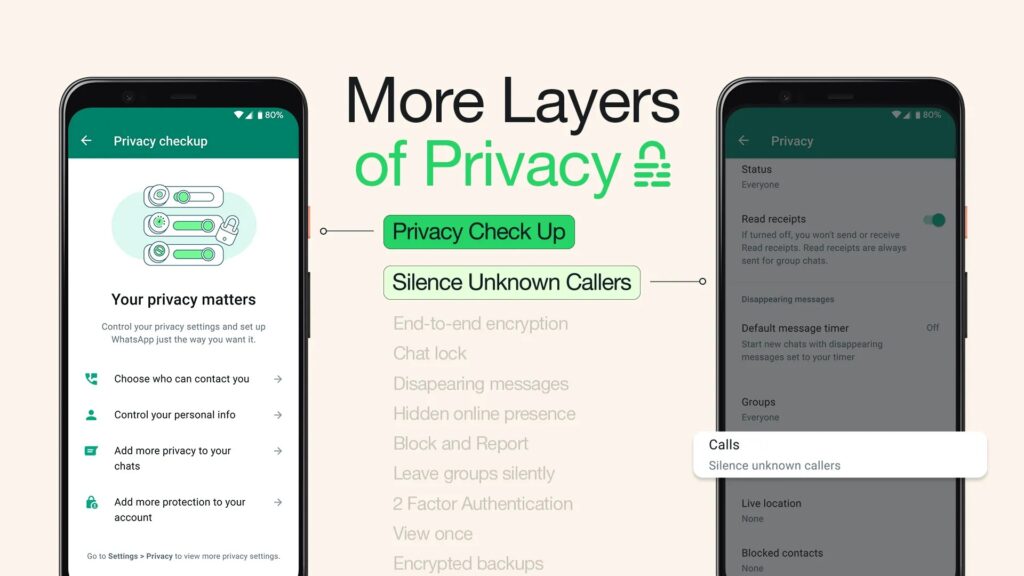
Image Credit: WhatsApp
Are Hidden WhatsApp Features Important?
Hidden WhatsApp features are important because they improve privacy, reduce distractions, save time and make conversations easier to manage. However, it is important to note that there have been several privacy concerns about WhatsApp too. Therefore, WhatsApp has been working on the aspects that have bothered consumers for years and small setting changes can dramatically improve the overall messaging experience.
Additionally, WhatsApp is also partly used as a digital workspace, private journal, business hub, file-sharing platform and social identity system all at once.
- For example, a freelancer may handle clients entirely through WhatsApp, a student may coordinate assignments and study groups through it, while families increasingly rely on it for financial discussions, travel planning and sharing sensitive documents.
- In all these situations, privacy, organisation and speed suddenly become far more important than simple texting.
- WhatsApp now includes advanced security tools such as Chat Lock, encrypted backups, disappearing messages and two-step verification to help users protect personal conversations.
- Hidden WhatsApp settings also improve media management. Features such as HD media sharing and customised media visibility settings help preserve image quality while preventing unnecessary files from consuming phone storage.
According to WhatsApp’s official privacy documentation, features like Chat Lock and encrypted backups provide additional layers of protection beyond end-to-end encryption.
What Are the Most Useful Hidden Features in WhatsApp?
Some of the most valuable advanced WhatsApp features include Chat Lock, message editing, multi-device access, HD media sharing, disappearing messages, and personalised privacy settings.
Here’s a quick overview before we break these down for you, further in the article:
| Feature | Main Benefit | Best For |
| Chat Lock | Extra conversation privacy | Personal chats |
| Edit Messages | Fix mistakes quickly | Professionals |
| Message Yourself | Notes and reminders | Productivity |
| HD Sharing | Better photo quality | Creators and families |
| Silence Unknown Callers | Spam protection | Everyone |
| Multi-Device Login | Cross-device access | Remote workers |
| Disappearing Messages | Temporary conversations | Privacy |
| Pin Important Chats | Faster access | Busy users |
| Custom Chat Lists | Data Organisation | Everyone |
| Privacy Controls | Custom visibility | Security-conscious users |
How Do You Lock Specific Chats on WhatsApp?
Chat Lock is a WhatsApp privacy feature that protects selected conversations using biometric authentication or a face scan. WhatsApp officially describes locked chats as hidden conversations stored inside a protected folder.
How to Enable Chat Lock on Android
Here are the simple steps to lock and hide a chat:
- Open WhatsApp and select the chat you want to lock. You can press and hold the chat to select it.
- Then tap the three-dot menu on the top right hand corner and select lock chat.
- Now, WhatsApp will ask you for a fingerprint scan or a face authentication to enable this feature.
How to Enable Chat Lock on iPhone
On the Apple ecosystem, the way is one step quicker:
- Open the chat and touch and hold the contact name or chat you want to lock.
- The options will pop up instantly.
- Choose Chat Lock
- You can enable this protection feature by setting up Face ID authentication on your device.
How does the WhatsApp Chat Lock feature help? Parents could use Chat Lock to secure financial conversations or sensitive family discussions from children using the same device. Chat Lock protects sensitive conversations without affecting the rest of your WhatsApp account.
Add an Extra Layer of Protection with Secret Codes
WhatsApp also allows users to create a Secret Code for locked chats, adding another layer of protection beyond biometric authentication. Instead of displaying locked conversations openly in the Chat Lock folder, users can hide them behind a custom code that must be entered in the search bar to reveal the chats.
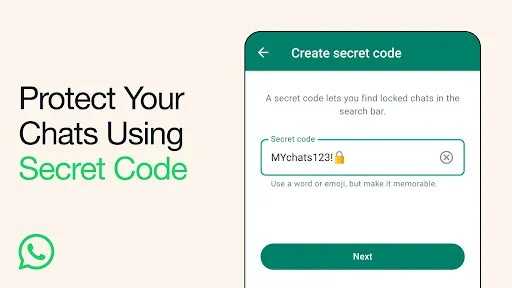
Image Credit: WhatsApp
How Can You Edit Sent Messages on WhatsApp?
WhatsApp Message Editing allows users to modify sent messages within 15 minutes after sending them. Modified messages are marked with an ‘Edited’ tag so recipients know changes were made after sending.
This feature is extremely useful for correcting spelling mistakes, fixing wrong information or clarifying rushed messages. Just like some email services allow an email recall or unsend option, WhatsApp Message Editing allows one to fix a message without deleting or recalling it.
How to Edit a Message on Android
- Long-press the message
- Tap the three-dot menu on the top right corner.
- Select Edit and make changes
- Finally, tap send
How to Edit a Message on iPhone
- Long-press the message
- Options will pop-up immediately.
- Tap Edit and update the message
- Save changes
An example of how this feature can be useful – a business owner sending pricing details can quickly correct a typo without deleting and resending the entire message.
Message editing reduces confusion and improves communication accuracy inside professional chats and personal chats both.
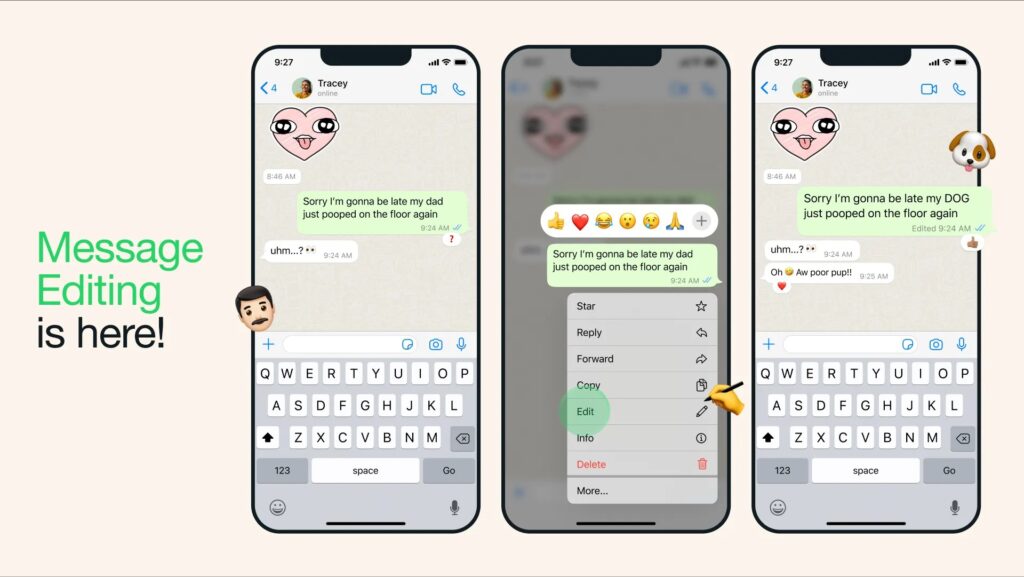
Image Credit: WhatsApp
Also Read: WhatsApp का नया फीचर: अब बिना Google Drive बैकअप के चैट सुरक्षित
What Is the Message Yourself Feature in WhatsApp?
The Message Yourself feature allows users to send notes, files, reminders and links to their own WhatsApp account. This turns WhatsApp into a lightweight productivity tool.
A large number of users still depend on separate apps to save quick notes, reminders, and important information. However, WhatsApp now lets you store any kind of notes and media as messages to yourself.
How to Use Message Yourself
- Open WhatsApp
- Tap New Chat and select your own profile
- Now you can start messaging yourself and let this chat function as your personal storage.
For example, one can save important ‘immediate’ documents like flight boarding pass, tickets, etc.
Professionals can also instantly transfer files between phone and desktop using their own chat.
Search WhatsApp Chats By Date
If you’d like to locate any conversation or media in your WhatsApp chat, but would like to save the hassle of scrolling endlessly through the chat, WhatsApp also offers a search by date option.
When you use the search option within any chat in the three-dots menu, a calendar icon appears on the right top corner. You can use this calendar feature and jump right into the desired timeline to search more effectively.
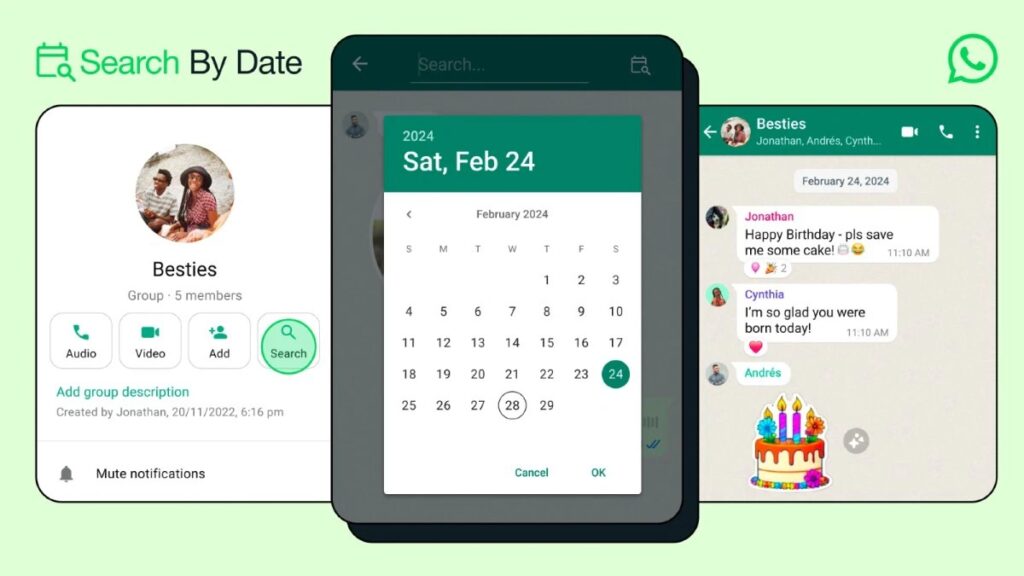
Image Credit: WhatsApp
Organise Chats Better with Custom Lists
WhatsApp’s Custom Lists feature helps users separate important conversations into personalised categories for quicker access and better organisation. Instead of scrolling endlessly through chats, users can create dedicated lists such as Family, Work, Clients, Friends or Study Groups to filter conversations more efficiently.
This feature is especially useful for people who manage large numbers of chats daily, including professionals, students, entrepreneurs and remote workers. By organising conversations into customised sections, users can reduce clutter and focus more easily on the messages that matter most.
To use this feature, go to the chat filters section at the top of WhatsApp and create your own custom lists based on contacts or groups.
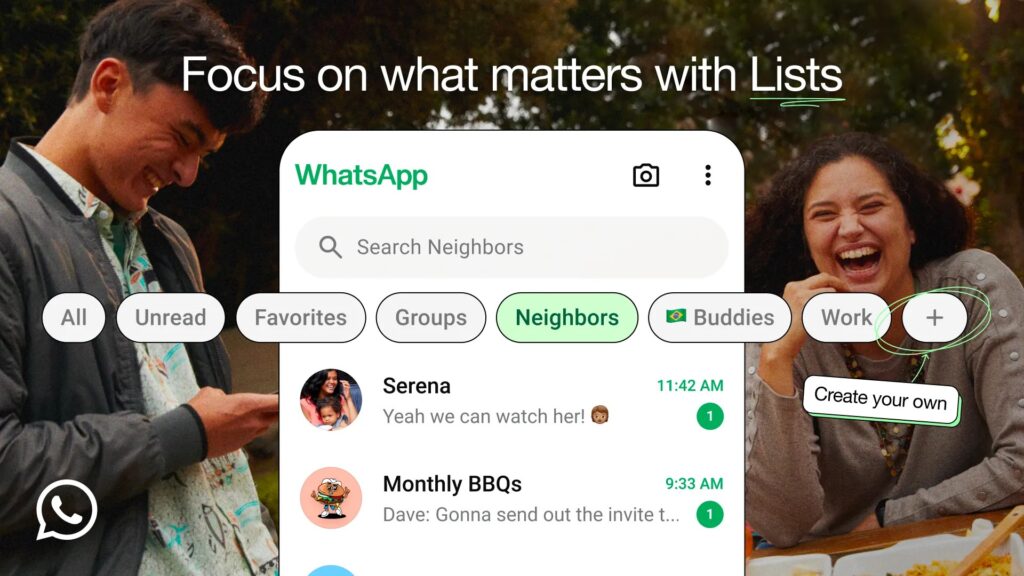
Image Credit: WhatsApp
If your chat list appears to be missing, you can simply restore them. To restore them, swipe downward on the main Chats screen and review your active filters and archived conversations.
How Do You Share HD Photos and Videos on WhatsApp?
Sharing high resolution pictures and videos had been a grave concern for users earlier as WhatsApp would compress files thereby downgrading the quality of such media. Standard WhatsApp compression often reduces image clarity dramatically. This becomes frustrating for photographers, designers, travellers and families sharing memories.
However, now HD media sharing allows users to send higher-quality photos and videos without severe compression. WhatsApp introduced official HD media support to improve visual quality for images and videos.
How to Send HD Photos on Android & iPhone
- Select a photo or video to send inside the chat
- Tap the HD button at the top among the edit options.
- It will show standard and HD quality options.
- Choose HD Quality and send the media
This is particularly useful when one wants to send high quality pictures and videos without switching to email or cloud storage. HD media sharing, therefore, improves image clarity while keeping file sharing simple inside chats.
Many users are not aware of this image quality upgrade option in WhatsApp and hence, forget to tap the HD option before sending media. As a result, WhatsApp applies default compression automatically.
How Can You Improve Privacy on WhatsApp?
Privacy has been the most important concern for users for not just Whatsapp, but all messaging apps across the board. WhatsApp claims to have taken cognizance of this concern.
WhatsApp privacy settings allow users to control visibility, account security and conversation protection directly from the app settings. WhatsApp officially states that users can customise who sees their activity and personal information.
Best WhatsApp Privacy Settings to Turn On Immediately
- Enable Two-Step Verification: Two-step verification adds an additional security layer to WhatsApp accounts by requiring a PIN during registration. The two-step verification can be enabled in settings under account settings.
- Turn On Fingerprint or Face Lock: This feature prevents unauthorised access to your app, but only if one is comfortable having a fingerprint or face lock.
- Silence Unknown Callers: Silence Unknown Callers automatically filters spam or suspicious calls. This feature can be found under privacy settings and then further in call settings.
- Control Last Seen and Online Status: WhatsApp now allows users to customise visibility for last Seen, online status, profile photo and status updates. For example, professionals often hide online status to reduce work-related interruptions outside office hours.
Customise Who Can See Your Activity on WhatsApp
WhatsApp’s advanced privacy controls allow users to choose exactly who can view their Last Seen status, profile photo, online activity and Status updates. Instead of making your information visible to everyone or completely hiding it, you can selectively exclude specific contacts for better personal privacy.
This feature could be especially useful for maintaining boundaries between work, family and personal life. For example, you may want friends to see your online activity while restricting visibility from colleagues, distant contacts or people you rarely interact with.
To manage these settings, go to Privacy settings and customise visibility options for Last Seen, Profile Photo, About and Status updates individually.
How Do Disappearing Messages Work on WhatsApp?
Disappearing Messages feature automatically deletes chats after a selected period to improve conversation privacy. WhatsApp currently supports timers such as 24 hours, 7 days and 90 days. This feature could be useful for temporary conversations containing sensitive information.
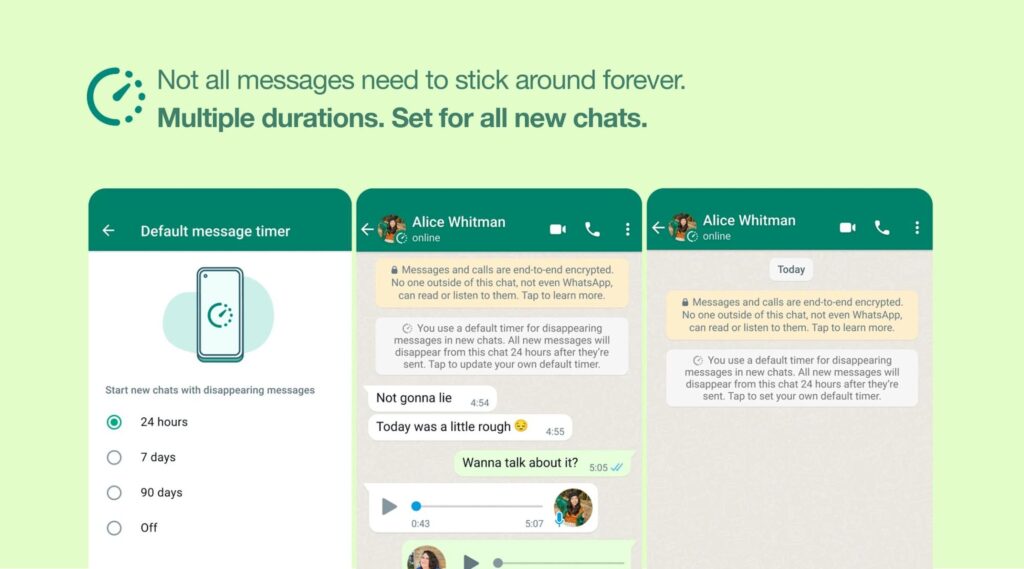
Image Credit: WhatsApp
How to Enable Disappearing Messages
- Open the chat and tap/touch-hold the contact or group name
- Now, select Disappearing Messages from the options that appear.
- Choose a timer duration
A use-case scenario for this could be for travellers sharing hotel details or family members sharing sensitive data such as financial information. Moreover, WhatsApp has reportedly been testing ‘delete after reading’ functionality for even stronger privacy controls (Source).
Disappearing Messages improve privacy by reducing the long-term storage of sensitive conversations.
What Are the Best WhatsApp Productivity Features for Professionals?
WhatsApp productivity features help users manage conversations, reduce clutter and improve workflow efficiency.
This is especially useful when work crosses over into your daily chat app. For example, professionals often deal with dozens of chats daily. Features such as pinned chats, multi-device support and message editing make communication faster and more organised.
- Pin Important Chats: Pinned chats keep priority conversations at the top of your chat interface. Therefore, managers can pin team groups, freelancers can pin active clients or students can pin study groups
- Multi-Device Login: Multi-device support allows WhatsApp users to access the same account across phones, tablets and computers simultaneously. WhatsApp officially rolled out expanded multi-device support in recent years.
- Disabling Auto-Download of Documents and Images: Under ‘Storage and Data’ settings, it is advisable to deselect pictures and documents in the ‘When Connected to Wi-Fi’ section. This can help protect against auto-downloading spam and suspicious files shared by hackers.
How to Link Devices
This could be a feature you have used as it has been around for a few years now:
- Open WhatsApp Settings
- Tap on the Linked Devices option.
- Then select ‘Link a Device’ options.
- It will open the camera to scan the QR code on desktop or tablet.
- This would immediately connect two devices and is particularly useful for remote workers who can continue conversations from a laptop even when the phone is offline.

Image Credit: WhatsApp
Format Your Messages for Better Communication
This is a bonus 11th hidden feature we will elaborate on. Though it is not a new feature by WhatsApp, most users are not aware of using it to the best possible benefits.
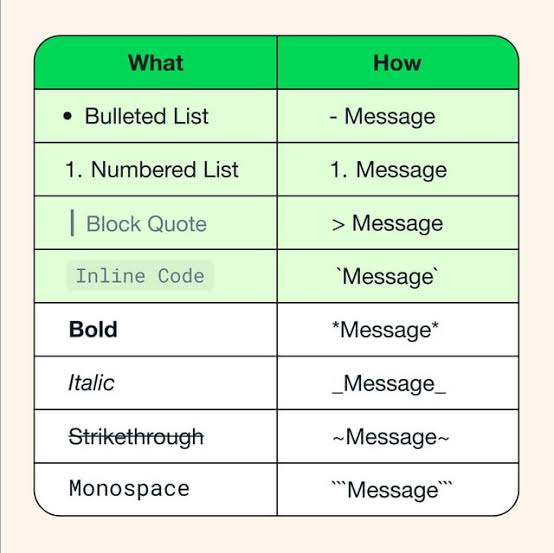
WhatsApp includes built-in text formatting tools that allow users to make messages clearer, more expressive, and easier to read. You can highlight important words using bold, italics, strikethrough text or monospace formatting directly inside chats without needing any extra apps.
For example:
- Add an asterisk before and after a word for bold. Example: *text*
- Use underscores for italics. Example: _text_
- Use tildes for a strikethrough. Example: ~text~
- Use triple backticks for monospace. Example: “`text“`
This feature is especially useful for professionals sharing instructions, students organising notes or anyone trying to make long messages more readable and structured.
In addition to this, one can also make numbered or bulleted lists, quote a message and put an online code. Learn how.
What Common Mistakes Do WhatsApp Users Make?
Though tech experts label it as common mistakes, they actually stem from the lack of knowledge that such features exist. Therefore, the common ignorance about WhatsApp features results from ignoring privacy settings, sharing unsecured backups, using public groups carelessly and failing to manage media properly.
Many users never review their privacy settings after installing the app. This leaves profile photos, online activity and status updates visible to everyone.
Common WhatsApp Mistakes to Avoid
Here are some overlooks one could avoid to maximise the benefits of the hidden WhatsApp features:
- Sending HD photos without enabling HD mode
- Leaving cloud backups unencrypted. WhatsApp now supports encrypted cloud backups for Google Drive and iCloud.
- Clicking suspicious links in public groups
- Using weak PINs for verification
- Ignoring app updates
Are Hidden WhatsApp Features Safe to Use?
Whatsapp assures that the hidden WhatsApp features are generally safe to use because they are officially developed and integrated by WhatsApp itself. Most advanced features focus on improving privacy, usability and account security.
According to WhatsApp, only the sender and recipient can access encrypted conversations as it uses end-to-end encryption for messages, calls, photos and videos.
However, users should still follow good cybersecurity habits, such as:
- Avoid unofficial WhatsApp mods. Read more about this here.
- Keep apps updated so that you have the latest security and privacy patches updated in your app.
- Enable two-step verification to add an extra defense layer.
- Avoid unknown links. This should be an unspoken rule for all users.
Official WhatsApp features are safer than third-party ‘WhatsApp hacks’ or modified apps, as always emphasised by WhatsApp.
What Should You Explore Next on WhatsApp?
As WhatsApp continues expanding beyond messaging into productivity, AI tools, business communication and multi-platform collaboration, a user needs to also explore the untouched territories to understand more hidden features that could prove useful.
Some features worth exploring next could be WhatsApp Channels, AI-powered chat tools, companion mode, WhatsApp Business automation and cross-device workflows.
Small businesses increasingly use WhatsApp Business for customer support and sales communication. WhatsApp also regularly introduces privacy upgrades and media-sharing improvements through updates via messaging users.
WhatsApp is gradually transforming from a simple messaging tool into a deeply integrated digital communication platform focused on AI assistance, identity protection, cross-device continuity and smarter personal interaction.
The Human Contradiction Hidden Inside Modern Communication
Messaging is no longer just about sending texts faster. It is about communicating more securely, managing digital identity more intelligently, reducing information overload and integrating AI into everyday interaction in practical ways.
Modern communication technology has connected humanity faster than ever before. With apps like WhatsApp, people can instantly share messages, photos, emotions, locations and ideas across the world within seconds.
Yet at the same time, modern communication has also exposed a strange contradiction of human life. People are more connected digitally, but often feel increasingly isolated emotionally. We constantly seek privacy through hidden chats, restricted visibility settings and selective audiences, while simultaneously feeling the urge to publicly display parts of our lives through statuses, stories and online presence.
Features such as Chat Lock, disappearing messages, custom privacy controls and Close Friends lists reveal something deeper about our current society – the growing tension and the continuous tussle between connection, exposure, identity and personal peace.
Though technology is useful, one cannot help but notice how it also reveals deeper human realities.
Why Inner Peace Cannot Be Downloaded Through Technology
Technology can certainly improve communication externally. However, true clarity, peace, compassion and understanding ultimately arise from inner wisdom rather than digital tools alone.
Human life is incomplete without the true spiritual knowledge bestowed by a Tatvdarshi Sant (the Complete, Enlightened Saint). His refuge alone can help humanity get rid of the chaos within and outside.
This is why the spiritual knowledge of Jagatguru Tatvdarshi Sant Rampal Ji Maharaj resonates with many people today. Sant Rampal Ji Maharaj is the only Complete Saint, the real Tatvdarshi Sant of our times. His teachings are based on the real essence of our sacred scriptures, dispensing the most righteous way of life to His disciples.
His unparalleled teachings emphasise truth, simplicity, humanity, mental peace, and freedom from negativity – values that are becoming increasingly important in an age dominated by constant notifications, information overload and digital distraction.
As communication technology becomes smarter, perhaps humanity must also learn how to become wiser. Discover the most profound and scientific spiritual knowledge by listening to the spiritual discourses of Sant Rampal Ji Maharaj on:
Website: www.jagatgururampalji.org
YouTube: Sant Rampal Ji Maharaj
Facebook: Spiritual Leader Saint Rampal Ji
‘X’ handle: @SaintRampalJiM
FAQs
Q1) What are the best hidden WhatsApp features to use in 2026?
Answer: The best hidden WhatsApp features in 2026 include Chat Lock, usernames, AI Writing Help, HD media sharing, disappearing messages and multi-device login.
Q2) Can you use WhatsApp without sharing your phone number?
Answer: WhatsApp is reportedly introducing usernames that may allow users to chat without revealing their personal phone numbers.