

ECI SIR 2026 Online Form: The Special Intensive Revision (SIR) 2026 is the Election Commission of India’s (ECI) major drive to clean and update electoral rolls. Through house-to-house enumeration and online submissions, it aims to remove deceased, duplicate, or ineligible entries while ensuring genuine voters remain listed. The online process is especially important for new or first-time voters. The online Enumeration Form is available nationwide via a single portal, making it accessible for all states and Union Territories.
Why Fill the SIR Form?
Submitting the form helps verify your details against older electoral rolls (often referencing data from around 2002–2005). It confirms your eligibility and family linkages. Missing the deadline (typically late July in many states, varying locally) could risk exclusion from the draft rolls published in coming weeks. Draft rolls are expected around late July, with final publication in early 2026.
Step-by-Step Guide to Fill SIR Online Form (Uniform Across India)
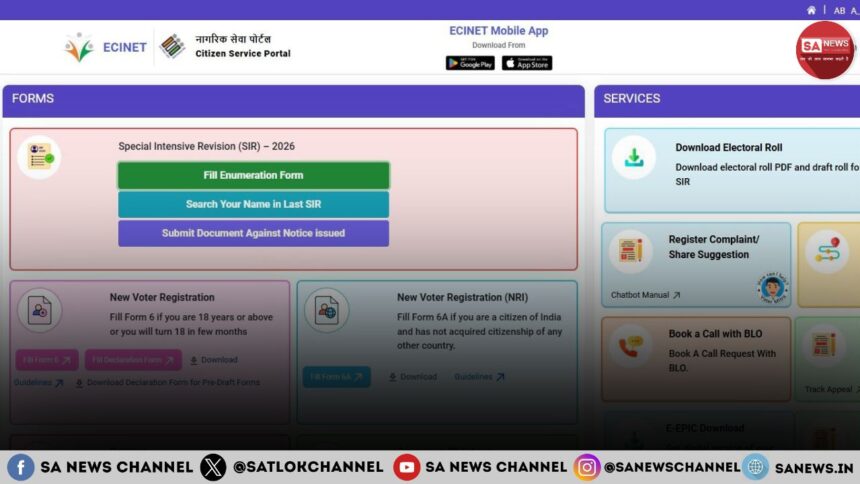
1. Visit the Official Portal: Go to [https://voters.eci.gov.in/] or (https://voters.eci.gov.in/). Look for the “Special Intensive Revision (SIR) – 2026” section and click “Fill Enumeration Form”.
2. Prepare Prerequisites
- Your EPIC (Voter ID) number.
- Mobile number linked to your EPIC (mandatory for OTP).
- Aadhaar details (for e-sign; name must match exactly with EPIC).
- Details of your or your parents’/grandparents’ presence in previous SIR rolls.
3. Login and Search: Select your state, enter your EPIC number, and search. Prefilled details will appear. Verify them carefully.
4. OTP Verification: Receive and enter the OTP sent to your linked mobile.
5. Choose Category
Select the appropriate option:
- Your name exists in the last SIR roll.
- Your parents’/grandparents’ names exist.
- Neither (new applicants).
New voters (especially 18+) often need to provide parental SIR details.
6. Fill Details and e-Sign
Update any changes, upload supporting documents if prompted, and complete e-sign with Aadhaar.
7. Submit and Download Acknowledgment
Save the confirmation for records.
State-Specific Notes
The core process is the same for all states through the national portal. However:
- States like Karnataka, Haryana, West Bengal, Kerala, Telangana, and Goa have active local campaigns with dedicated CEO websites offering PDFs, videos, and BLO contacts (search “CEO [State] SIR 2026”).
- Deadlines may differ slightly (e.g., some areas had July 14 cut-offs; check your state CEO site).
- Regional language support is available on the portal and state pages.
- For North-Eastern states or others with unique demographics, BLOs provide extra on-ground help.
Where People Commonly Get Stuck & How to Move Forward
- Mobile Not Linked to EPIC: Most frequent issue. Solution: First submit Form-8 (Correction) on the same portal under “Correction of Entries” → Link mobile only. Wait a few minutes and retry.
- Name Mismatch (Aadhaar vs EPIC): e-Sign fails. Correct your name via Form-8 or visit BLO/ERO before retrying.
- “Name Not Found” or Category Confusion: New voters or those not in old rolls should choose the “Neither” category and provide family details. Use the portal’s “Search Your Name in Last SIR” tool. Contact BLO if records don’t match.
- Portal Errors (405 Not Allowed, Slow Loading): Common during peak hours. Try incognito mode, different browser/device, or off-peak times (early morning/late night). Clear cache or wait and retry.
- No OTP or Technical Glitches: Ensure mobile is linked and in coverage. Use a desktop for a better experience.
- Unsure About Next Steps After Online Submission: Download acknowledgement. BLOs may still visit; some advise filling physical form too for safety in early phases. Track status via portal or BLO.
- Documents/Eligibility Doubts: Keep Aadhaar, ration card, or age proof ready. Transgender/queer voters or those with name changes should consult local ERO for support.
Final Tips for Success
- Fill the form as soon as possible – don’t wait for BLO if you can do it online.
- Be accurate; false information can lead to rejection or notices.
- For help: Call National Grievance Service (1950), contact your BLO, or visit state CEO sites.
- New voters: Parental linkage is crucial under current guidelines.
- After submission, check draft electoral rolls (expected soon) and file claims if needed.
Filling the SIR form is a simple yet powerful way to secure your voting rights. By acting promptly and accurately, you contribute to cleaner, more transparent elections. Don’t hesitate to seek local assistance — the system is designed to include everyone eligible. Start today at voters.eci.gov.in!
The Eternal Registration: Beyond Temporary Identity and Mortal Citizenship
Filling out the SIR 2026 Online Enumeration Form is a vital step for new voters to claim their democratic identity in India. Yet, have we ever paused to think about the fleeting nature of this world? We spend our entire lives diligently securing temporary voter IDs, passports, and registries to establish our citizenship in a mortal land. But does any earthly constitution guarantee us eternal safety from suffering, disease, or the inevitable cycle of death?
This makes us wonder: what is the ultimate purpose of this precious human life? Is our existence limited only to secular duties and temporary identities?
Jagatguru Tatvdarshi Sant Rampal Ji Maharaj reveals that our true soul-citizenship belongs to Satlok—the eternal realm of Supreme God Kabir, free from decay and sorrow. While performing worldly duties is essential, registering our soul in the court of the Supreme Creator through true spiritual worship is our ultimate duty. Under the guidance of a Complete Saint, we can secure permanent liberation. Today, Sant Rampal Ji Maharaj is the Complete Saint Who is giving us that path.
Discover the real purpose of human life in this eye-opening video:
Begin your journey toward eternal liberation today:
Website: www.jagatgururampalji.org
YouTube: Sant Rampal Ji Maharaj
Facebook: Spiritual Leader Saint Rampal Ji
‘X’ handle: @SaintRampalJiM
FAQs on SIR 2026 Online Enumeration Form
Is the SIR online form process different for each state in India?
No, the process is uniform nationwide via voters.eci.gov.in. Only deadlines and local support vary by state CEO websites.
What should new 18+ voters do if their or parents’ names are not in previous SIR rolls?
Select the “Neither” category and provide family details. Contact BLO if issues persist after using the portal search tool.
What to do if facing technical errors while submitting the SIR form online?
Link mobile via Form-8, ensure Aadhaar name match, try different device/browser, or fill physical form via BLO. Call 1950 for help.